

A timesheet looks like the simplest document in any business. It’s a grid of days and hours. But the person filling it in changes what it needs to do. An hourly employee needs overtime worked out correctly. A freelancer needs to know what to bill and who to bill it to. A small-business owner needs something people will actually fill in on time, and that will stand up if the Department of Labor ever asks.
So rather than one generic grid, this page has two free timesheet templates and a short guide to which parts matter for which person. The Excel file is a weekly calculator, plus a client time log on a second tab. The Word file is a printable pay-period timesheet for teams that still sign paper. Both are filled in with sample hours, so you can see them working before you clear them out.
Quick start: five minutes to your first timesheet
- Download the Excel template and open the Weekly Timesheet tab.
- Type the employee’s name, the Monday that starts the week, the hourly rate and your overtime threshold (40 is the US federal default) into the shaded cells.
- Enter start, lunch and finish times for each day. Type 7:00 or 3:30 PM. Excel will understand either.
- Read the bottom line. Hours, regular time, overtime and gross pay fill in on their own.
- Print it or save it as a PDF, get it signed, and keep a copy. That’s the whole routine.
If you’d rather hand out paper, skip to the Word template further down. It works the same way, minus the math.
The Excel timesheet: what it does for you
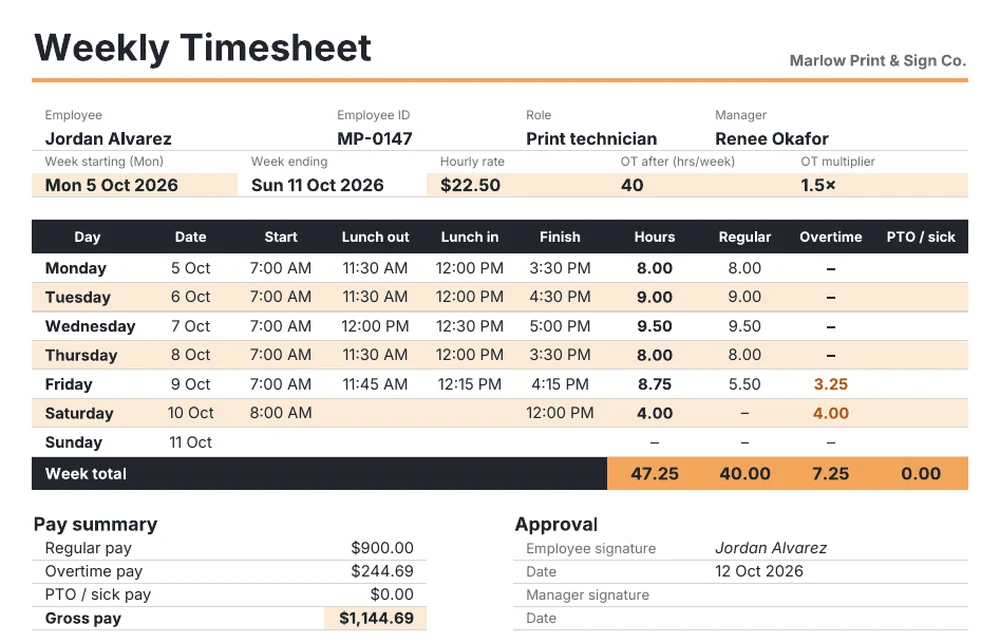
The sample week belongs to Jordan, a print technician who worked a long Wednesday, a late Friday and a Saturday morning. That came to 47.25 hours. The sheet keeps a running count of regular hours, so overtime kicks in at exactly the point Jordan crosses 40. Here, that’s partway through Friday, not on some arbitrary day. That’s how US federal overtime works: it’s based on hours in the workweek, not hours per day.
| Line | How it’s calculated | Sample week |
|---|---|---|
| Hours per day | Finish minus start, minus the lunch gap | 8.00 to 9.50 |
| Regular hours | Running total, capped at the threshold you set | 40.00 |
| Overtime hours | Everything over the cap | 7.25 |
| Overtime pay | OT hours × rate × multiplier (1.5) | $244.69 |
| Gross pay | Regular + overtime + PTO | $1,144.69 |
A few details took some testing. A shift that finishes after midnight still calculates correctly, because the formula wraps the clock. A day with no lunch break is fine, so Saturday’s four hours don’t need dummy entries. The time cells reject nonsense like “7 o’clock”, so you won’t end up with a quietly broken total.
Which parts matter depends on who you are
This is where most timesheet advice goes generic. Here’s the same template seen from three chairs.
If you’re an hourly employee
Your timesheet is your evidence. If your paycheck looks short, it’s the only document you control. Three habits make it bulletproof:
- Fill it in daily, not on Friday afternoon. A week of guessed start times is how 15 minutes a day goes missing. That’s over 60 hours a year.
- Record the real lunch, not the scheduled one. If you ate at your desk and answered calls, that time isn’t an unpaid break. Under federal rules, short breaks of about 5 to 20 minutes are paid time anyway.
- Keep your own copy. Save the PDF before you send it. If there’s a dispute later, a copy dated the week it happened is worth a lot more than memory.
Check the overtime column every week. If you’re non-exempt and it says 7.25 while your pay stub says 5, that’s a conversation worth having.
If you’re a freelancer or contractor
You probably don’t care about overtime. You care about two numbers: billable hours and your real hourly rate. That’s what the second tab, Client Time Log, is for. Every block of work gets one line: client, task, start, finish and whether it’s billable. The sheet then totals hours and fees for each client.
The sample tells a familiar story. A designer logs 15.75 hours across three clients in a week, but only 14.25 of them can be billed. The rest went on admin and a re-export that was the designer’s own mistake. Their quoted rates run from $60 to $70, but the effective rate across every hour worked comes out at $59.21. Watch that number over a month. It tells you which clients are actually worth it.
Track non-billable time too, even though nobody pays for it. If you only log billable hours, you’ll keep underquoting, because you’ll never see how much invoicing, revisions and email take.
If you run a small team
Your problem isn’t formulas. It’s getting timesheets back on time, complete and signed. What helps:
- Pick one workweek and stick to it. The template assumes Monday to Sunday. If your payroll week runs Sunday to Saturday, change the start date and the rest follows.
- Set the overtime rules once. The threshold and multiplier sit in two cells at the top. If you’re in a state with daily overtime, such as California, you’ll need a daily rule on top of the weekly one. The template only handles the weekly federal rule.
- Make approval a real step. There’s a manager signature line for a reason. An unapproved timesheet that went straight to payroll is a weak record.
- Keep them. Federal rules expect payroll records to be kept for three years, and time cards and wage-calculation records for two. A folder of signed PDFs per pay period covers it.
Once timesheets are in, they feed straight into the rest of the payroll paperwork. Our payroll report template picks up where this one stops, and the attendance report template is better for spotting absence patterns across a whole team than a stack of individual sheets.
The Word timesheet: for paper, clipboards and signatures
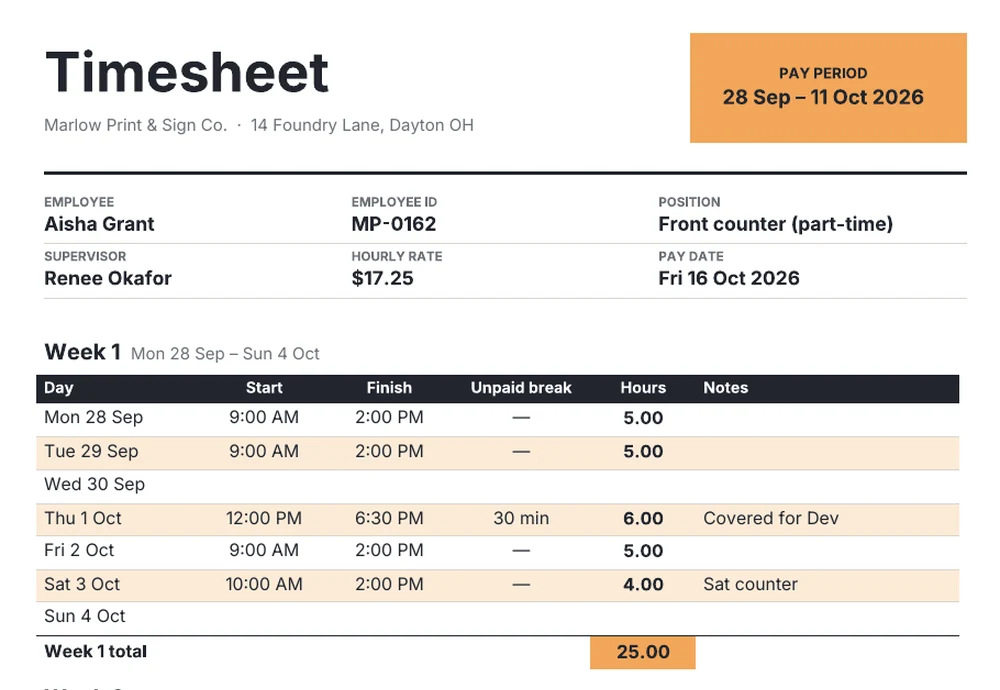
Some workplaces simply run on paper. Think of a shop counter, a job site trailer, or a volunteer desk. This version is a two-week pay-period form with a row for every day, a notes column and a summary strip at the bottom. In the sample, Aisha worked 25 hours in week one and 21 in week two. That’s 46 hours, or $793.50 at $17.25 an hour, and no overtime because neither week went over 40.
That last point trips people up. A two-week period with more than 80 hours doesn’t automatically mean overtime, and one with fewer than 80 doesn’t rule it out. Overtime is counted week by week. A 50-hour week followed by a 30-hour week still owes 10 hours of overtime, even though the period total is exactly 80. The Word form keeps the weeks separate on purpose so that this is obvious at a glance.
Because it’s a normal Word table, you can add a column for job codes, rename “Unpaid break” to suit your policy, or switch the period to weekly by deleting the second block.
Small things that keep timesheets honest
- Pick a rounding rule and write it down. Rounding to the nearest quarter hour is common and allowed in the US, as long as it evens out over time and doesn’t always favor the employer. Rounding 7:07 to 7:15 and 4:53 to 4:45 every day isn’t neutral.
- Don’t let anyone pre-fill the week. A timesheet showing exactly 8.00 hours every day for a month is usually fiction, and it protects nobody.
- Use the notes column. “Covered for Dev” or “inventory count” takes four seconds and answers a question a manager would otherwise have to ask.
- Store the signed copy, not the spreadsheet. A spreadsheet can be changed later. A signed PDF from the week in question is the actual record.
Which template should you pick?
| You are… | Start with | Why |
|---|---|---|
| Hourly employee tracking your own time | Excel: Weekly Timesheet tab | Overtime and pay are worked out the way payroll should do them |
| Freelancer or contractor | Excel: Client Time Log tab | Billable hours, fees per client and your real hourly rate |
| Manager with paper-based staff | Word: pay-period form | Prints cleanly, signs easily, weeks kept separate for overtime |
| Manager with staff on laptops | Excel, one file per person per week | Totals and pay calculate as soon as the hours go in |
For a weekly summary of what the team actually got done, rather than how many hours it took, pair these with the weekly report templates. Hours tell you what work cost. A weekly report tells you what it produced.
Both timesheet files are free to use, edit and share inside your business. Clear the sample hours, put in your own company name, and save a blank copy as your master before the first real week goes in.

![Top 16 Useful Annual Report Templates [Word Excel Formats]](https://www.reportsexcel.com/wp-content/uploads/2025/10/annual.png)