

A turnover rate on its own tells you very little. “We were at 19% last year” sounds like a fact, but it hides the questions that actually matter. Who left? How long had they been with you? Did you want to keep them? Did they quit, or did you let them go?
A good employee turnover report answers those questions on one or two pages, and it does the math the same way every month so the trend means something. This guide walks through how to calculate turnover properly, which numbers deserve a place next to the headline rate, and how to read the result without overreacting to it. You can download a free employee turnover report template in Excel and Word along the way. Both files come filled in with a year of sample data from a fictional home health agency so you can see the finished report before you add your own.
Start with the formula (and the two places people get it wrong)
The standard calculation is simple:
Turnover rate = number of separations in the period ÷ average headcount in the period × 100
A separation is anyone who left the payroll for any reason: resignations, terminations, layoffs and retirements. Most of the arguments start with the two inputs.
Mistake 1: dividing by today’s headcount
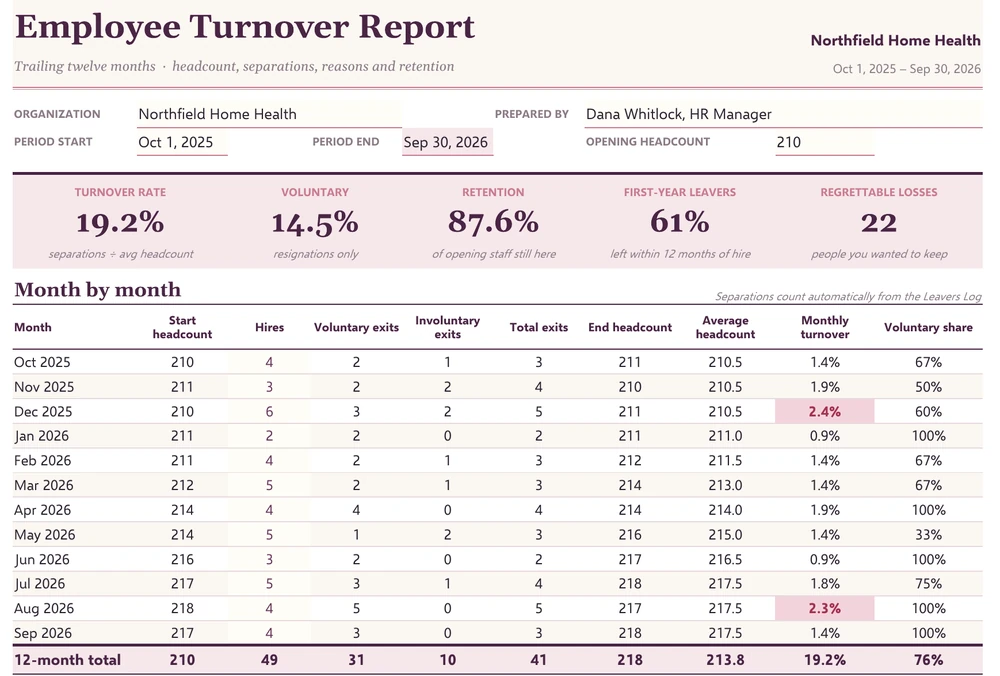
If you divide twelve months of exits by the headcount on the last day of the year, a company that grew will look better than it is and one that shrank will look worse. Use an average instead. The cleanest version is the average of each month’s (opening headcount + closing headcount) ÷ 2, then the average of those twelve figures. That’s what the Excel template does in the Average headcount column.
Here’s the sample company’s year in short form:
| Period | Opening headcount | Hires | Exits | Closing headcount | Average headcount | Turnover |
|---|---|---|---|---|---|---|
| Oct 2025 – Sep 2026 | 210 | 49 | 41 | 218 | 213.75 | 41 ÷ 213.75 = 19.2% |
Divide by the closing figure of 218 instead and you get 18.8%. Small difference here, but at a company that hired fast or ran a layoff it can be several points.
Mistake 2: annualizing a single bad month
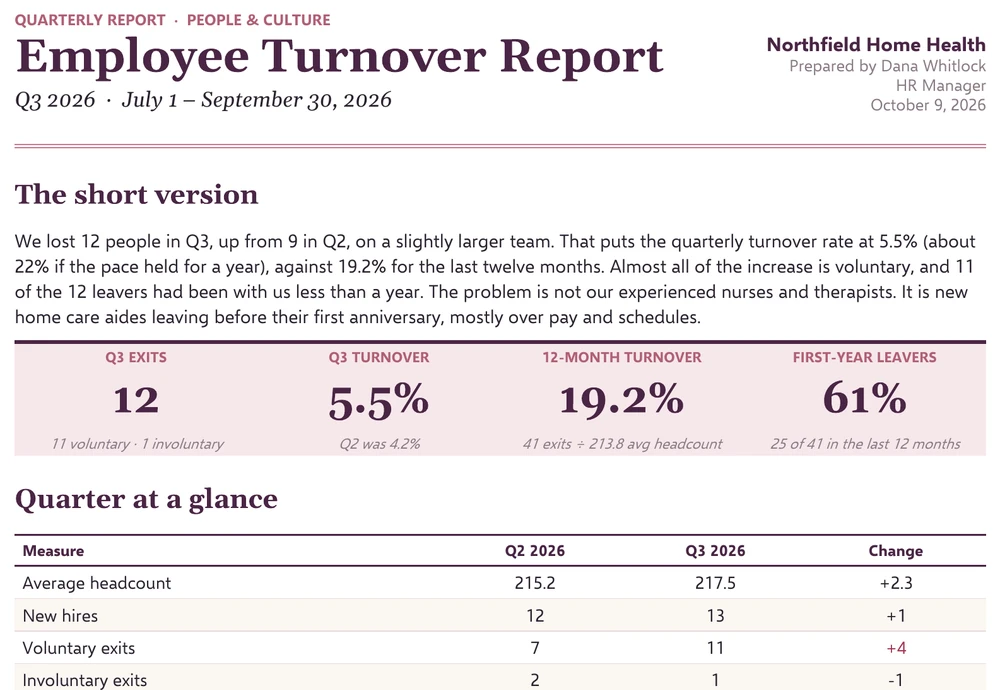
One month of 2.4% turnover is not “29% a year.” Monthly figures jump around, especially in small teams, so treat them as a signal to look closer rather than as a forecast. If you do report a quarter, say clearly whether the number is quarterly (Northfield’s Q3 was 5.5%) or annualized (about 22% at that pace). Mixing the two in one slide is how a board ends up debating the wrong figure.
A third, smaller point: decide up front whether to include temporary staff, interns and internal transfers. Most HR teams leave out transfers and seasonal workers. Either way, write the rule in the report so next year’s numbers can be compared fairly.
Four numbers that matter more than the headline rate
The overall rate is a starting point. These four tell you what’s behind it, and all of them are calculated for you in the template.
Voluntary turnover
Resignations only, divided by the same average headcount. This is the number most people mean when they say “turnover,” and it’s the one you can do the most about. In the sample, 31 of the 41 exits were voluntary, so voluntary turnover is 14.5%. The other 10 were terminations for attendance, performance or policy reasons. Those deserve attention too, but they say more about hiring and onboarding than about why people choose to leave.
First-year turnover
The share of leavers who had been with you less than a year. This one is often the most useful number in the whole report. At Northfield it’s 61%: 25 of the 41 people who left hadn’t reached their first anniversary. When most of your exits come from new hires, the fix usually lies in recruiting, pay at the entry level and the first 90 days, not in engagement surveys for long-serving staff.
Regrettable losses
A plain count of the leavers you would have hired back tomorrow. It’s a judgment call made by the manager, and that’s fine. Twenty-two regrettable exits tells a very different story from 41 total. If your best performers are leaving, the headline rate can look healthy while the organization is quietly getting weaker.
Retention rate
Turnover’s mirror image, but not exactly the opposite. Retention asks: of the people employed on day one of the period, what share are still here at the end? New hires who joined and left within the year don’t count. In the sample, 26 of the 210 opening employees left, so retention is (210 − 26) ÷ 210 = 87.6%. The Excel file works this out with a COUNTIFS that looks for leavers whose hire date is before the period start.
The templates
Two files, one dataset. Use the spreadsheet as the working tool that HR updates every month. Use the Word document when the numbers need to go to leadership with some explanation attached.
Excel: Employee Turnover Report with Leavers Log
The workbook has four tabs:
- Turnover Summary: five headline figures at the top (turnover, voluntary turnover, retention, first-year leavers and regrettable losses), a twelve-month table, and breakdowns by exit reason and by tenure at exit.
- By Department: exits, voluntary and involuntary split, turnover rate, first-year exits, average tenure of leavers and regrettable losses for each team. Any department running above the company rate is highlighted.
- Leavers Log: one row per person who left, with drop-downs for department, separation type, exit reason and the regrettable flag. Tenure in years and a tenure band are calculated from the hire and exit dates.
- Lists: the departments and exit reasons that feed the drop-downs. Rename them to match your organization.
You only type in three places: the period start date and opening headcount, the number of hires each month, and the Leavers Log. Monthly exits are counted from the log with COUNTIFS on exit date and type, closing headcount is opening + hires − exits, and every rate follows from there. Months running more than 25% above the average monthly rate are shaded, and two small checks warn you if a leaver has no exit reason or if the department totals don’t match the summary.
Word: Quarterly Employee Turnover Report
A two-page write-up for a leadership meeting, built on the same data. It opens with a short plain-language summary and four headline figures, then compares this quarter with the last one, shows turnover by department, lists the main exit reasons with an anonymized quote from an exit interview, sets out the actions being taken with owners and due dates, and ends with a short watch list for next quarter and a sign-off block. Replace the sample text with your own. The structure is the useful part.
Reading a real report: what the Northfield numbers say
Numbers only help if someone draws a conclusion from them. Here’s how I’d read the sample data if it landed on my desk.
The headline is fine. The detail isn’t. 19.2% annual turnover is unremarkable for a home care business, where aide roles turn over constantly. Stopping there would miss the point, though. The department view shows where the exits are concentrated:
| Department | Avg headcount | Exits | Turnover | Exits in first year |
|---|---|---|---|---|
| Home Care Aides | 92 | 21 | 22.8% | 16 |
| Field Nursing | 56 | 10 | 17.9% | 5 |
| Therapy | 23 | 3 | 13.0% | 0 |
| Scheduling & Intake | 19 | 4 | 21.1% | 2 |
| Administration | 24 | 3 | 12.5% | 2 |
Aides make up 43% of the workforce but account for half of all exits and 16 of the 25 first-year leavers. That one group is the story.
The quarter got worse, and in a specific way. Q3 had 12 exits against 9 in Q2. Eleven of the twelve were voluntary and eleven had less than a year of service. When the same pattern shows up in both columns, it usually points to one cause rather than several.
The exit reasons line up with the tenure data. Pay or a better offer is the top reason (10 exits), followed by schedules and hours (7). All four “career growth” exits were aides leaving to study nursing. Put together: newer aides are leaving early, for slightly better pay and more predictable schedules. That’s something the business can act on, which is why the Word report pairs each finding with an action and an owner.
Small teams need a footnote. Scheduling & Intake shows 21.1%, which looks alarming until you see it’s four people on a team of nineteen. The template highlights it because it’s above the company rate. A human still has to decide whether it matters.
Watch the regrettable count in Field Nursing. Ten exits, seven of them regrettable. Nurses are harder to replace than aides, so a lower turnover rate can still hurt more. That’s why regrettable losses get their own column.
Should you compare yourself to an industry benchmark?
Carefully. Published benchmarks vary a lot depending on who collected them, which separations they count and how they define headcount. In the United States, the Bureau of Labor Statistics publishes monthly quits and total separation rates by industry in its JOLTS survey, and many industry associations run their own surveys. Both are worth a look for context.
The comparison that matters most is with yourself: the same calculation, run the same way, every month. If your first-year turnover drops from 61% to 45% after you change onboarding, that tells you far more than learning you’re three points above some sector average. If you do quote a benchmark, put the source and the year next to it, and make sure you’re comparing like with like, such as voluntary with voluntary or annual with annual.
Monthly, quarterly or once a year?
All three, at different levels of detail.
- Monthly: update the Leavers Log and the hires column. Takes ten minutes if exits are logged as they happen. Look at the shaded months and the department view, and leave it there unless something stands out.
- Quarterly: write the Word report. Compare the quarter with the one before, pick out two or three findings, and agree actions with owners. Most leadership teams don’t need more often than this.
- Annually: run the full twelve-month view, review your exit reason list (rename anything vague, split “Other” if it’s grown), and reset targets.
Turnover rarely tells the whole people story alone. It sits well next to an employee performance report, since you’ll want to know whether the people leaving were strong or weak performers, and an attendance report, because rising absence often comes a few months before resignations. If you track people measures alongside business ones, a KPI report can carry the headline turnover and retention rates each month.
Getting exit reasons you can trust
The exit reason column is the weakest part of most turnover reports, so it’s worth a few minutes of extra care.
- Keep the list short. Eight to twelve reasons is plenty. If one reason grows past about a quarter of exits, split it into more specific ones.
- Separate the stated reason from the real one. “Personal reasons” on a resignation letter often turns into “my manager” in a candid exit conversation. Record the reason you believe is true and note how you know.
- Track exit interview completion. The template shows it at 77% of voluntary leavers. Below about 70%, your reasons breakdown is based on too few people to lean on.
- Ask someone other than the direct manager. People are more open with HR, or with a short anonymous form, than with the boss they’re leaving.
Keep the log factual, the way you would in an employee incident report: dates, roles and reasons, not opinions about the person. Some of what lands in it is sensitive, so store the workbook where only HR and the people who need it can open it, and share the department and company totals rather than the named list.
One last thing
The most useful turnover reports I’ve seen are short. They show a rate calculated the same way every time, the three or four figures that explain it, and a sentence or two about what the team will do next. The template takes care of the calculations. The judgment about what the numbers mean is still yours, and it’s the part leadership will actually remember.

![15 Weekly Status Report Templates [Word Excel Formats]](https://www.reportsexcel.com/wp-content/uploads/2025/10/weekly-status.png)