

$48,212.67 on the bank statement. $45,320.96 in the general ledger. Same checking account, same day, and the two numbers are $2,891.71 apart.
If you’ve ever stared at a gap like that at month-end, here’s the good news: it’s almost never a mystery, and it’s almost never fraud. It’s a pile of small, explainable differences that haven’t been sorted yet. Sorting them is what a bank reconciliation is.
This post follows one month for a small business, Harbor Lane Bakery, from the messy before to the tidy after. Every item that caused the gap is listed, explained and fixed, so you can see exactly how a bank reconciliation template gets from $2,891.71 to zero. The Excel workbook and the Word statement used here are free to download, and both come filled in with this example so you can check your work against it.
Before: what the two numbers actually mean
The bank balance is what the bank has processed by the statement date. The ledger balance is what your bookkeeping says you should have. They disagree for three reasons, and only three:
- Timing. You’ve recorded something the bank hasn’t processed yet: a deposit made on the last evening of the month, or a check the supplier hasn’t cashed.
- Information the books don’t have yet. The bank has done something you haven’t recorded: charged a fee, paid interest, collected a customer payment by ACH, or bounced a check you deposited.
- Mistakes. Usually yours, occasionally the bank’s. A transposed number, a duplicate entry, a payment posted to the wrong account.
Keep those three buckets in mind. Each one gets fixed on a different side of the reconciliation, and mixing them up is the most common reason a reconciliation that should take half an hour takes all afternoon.
Here’s the starting point in the Excel template, with the September statement balance and the ledger balance typed into the two copper cells at the top of each column. Everything else on the sheet is calculated from the item lists on the other tabs.
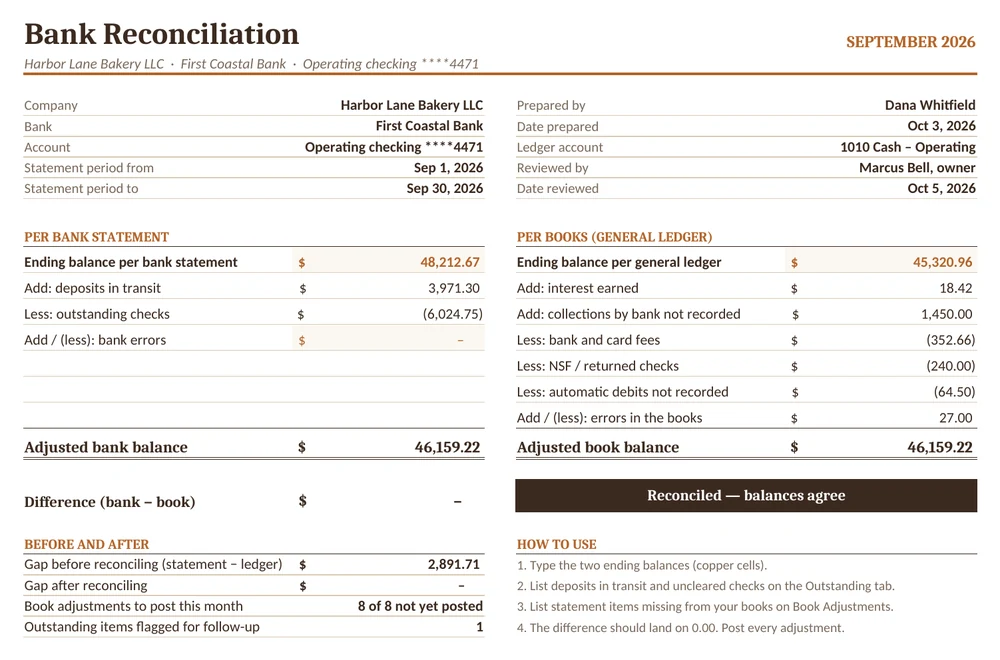
The workbook has four tabs: Reconciliation (the summary above), Outstanding (deposits in transit and uncleared checks, with days outstanding worked out for you), Book Adjustments (bank items missing from your books, each with its journal entry) and Monthly Log (one line per month, so a year of reconciliations sits on a single screen).
Pass 1: things the bank hasn’t caught up with
Start with timing, because it’s the easiest. Put last month’s reconciliation next to this month’s statement and tick off everything that has now cleared. Then go through this month’s ledger and look for deposits and checks that don’t appear on the statement yet.
Harbor Lane had two deposits in transit and five checks still out:
| Item | Date | Amount | Days out |
|---|---|---|---|
| Card batch (settles next morning) | Sep 30 | 2,846.30 | 0 |
| Cash and checks, night drop | Sep 30 | 1,125.00 | 0 |
| Check #2187, Keystone Flour Supply | Sep 24 | 3,420.00 | 6 |
| Check #2191, Valley Dairy Co-op | Sep 26 | 1,268.45 | 4 |
| Check #2193, city water bill | Sep 28 | 312.80 | 2 |
| Check #2194, Ortega Oven Repair | Sep 29 | 975.00 | 1 |
| Check #2152, J. Park (customer refund) | Jun 18 | 48.50 | 104 |
Deposits in transit are added to the bank balance and outstanding checks are subtracted, because the bank will catch up with both within a few days. After this pass the bank side reads 48,212.67 + 3,971.30 − 6,024.75 = $46,159.22. That’s the adjusted bank balance, and it won’t move again unless the bank itself made an error.
Notice the last line. A check written in June and still not cashed in September isn’t a timing difference anymore. It’s a lost check, a customer who never deposited it, or something worse. The template flags anything past 60 days as Follow up so it can’t hide in the list. Somebody should call J. Park this week.
Pass 2: things the bank knows and your books don’t
Now read the statement line by line, looking for anything the bank did on its own. These items are never corrected on the bank side. The bank is right; your books just don’t know yet. Each one goes on the Book Adjustments tab and needs a journal entry.
| Statement item | Effect on books | Why it happened |
|---|---|---|
| Interest credited | +18.42 | Paid by the bank on the last day of the month |
| ACH from Lakeside Events | +1,450.00 | Customer paid a catering invoice straight into the account |
| Account service fee | −25.00 | Monthly charge |
| Card processing fees | −312.66 | Deducted by the processor, not invoiced |
| Returned check, Delgado Catering | −240.00 | Customer’s check bounced |
| Returned item fee | −15.00 | Bank charge for the bounced check |
| Payroll service ACH fee | −64.50 | Automatic debit nobody entered |
Two of these deserve a second look. The $1,450 ACH payment means a customer invoice is still showing as unpaid on your receivables, so recording it fixes cash and accounts receivable at the same time. And the returned check goes back onto the customer’s balance, because they still owe you. If you track receivables in an AR aging report, both changes show up there too.
Pass 3: the $27 that was our own fault
After passes 1 and 2, Harbor Lane’s book side came to $46,132.22. The bank side was $46,159.22. Still $27.00 apart.
A small, round-ish leftover like this is nearly always a recording error, and there’s an old bookkeeper’s trick for finding it: if the difference divides evenly by 9, look for a transposition, two digits swapped. 27 ÷ 9 = 3, so the culprit is likely a pair of adjacent digits that differ by 3.
Scanning the cleared checks turned it up in a couple of minutes. Check #2183 to Rossi Packaging cleared the bank at $658.00. It had been entered in the ledger as $685.00. The books had taken out $27 too much, so the correction adds $27 back to the book balance and takes it off packaging supplies expense.
Errors like this are why you reconcile from the statement’s cleared amounts, not from your own check register. The bank processed what was written on the check. Your register shows what someone typed.
After: both sides at $46,159.22
With every item in place, the reconciliation reads:
| Per bank statement | Amount | Per books | Amount |
|---|---|---|---|
| Ending balance | 48,212.67 | Ending balance | 45,320.96 |
| Deposits in transit | 3,971.30 | Interest and ACH collection | 1,468.42 |
| Outstanding checks | (6,024.75) | Transposition correction | 27.00 |
| Bank errors | 0.00 | Fees, NSF check, ACH fee | (657.16) |
| Adjusted bank balance | 46,159.22 | Adjusted book balance | 46,159.22 |
Difference: $0.00. The status bar in the template turns from red to brown and reads Reconciled.
But the job isn’t quite done. The adjusted book balance only exists on paper until the adjustments are posted. Harbor Lane needs two journal entries, which the template writes out for you on the Book Adjustments tab:
- AJE-1: debit Cash 1,495.42; credit Interest income 18.42, Accounts receivable (Lakeside Events) 1,450.00 and Packaging supplies 27.00.
- AJE-2: debit Bank and merchant fees 352.66, Accounts receivable (Delgado Catering) 240.00 and Payroll service fees 64.50; credit Cash 657.16.
Once those are posted, the ledger reads $46,159.22, and next month’s reconciliation starts from a clean, agreed number. A Posted? column next to each adjustment makes it obvious when something was reconciled but never booked, which is a surprisingly common way for the same difference to come back every month.
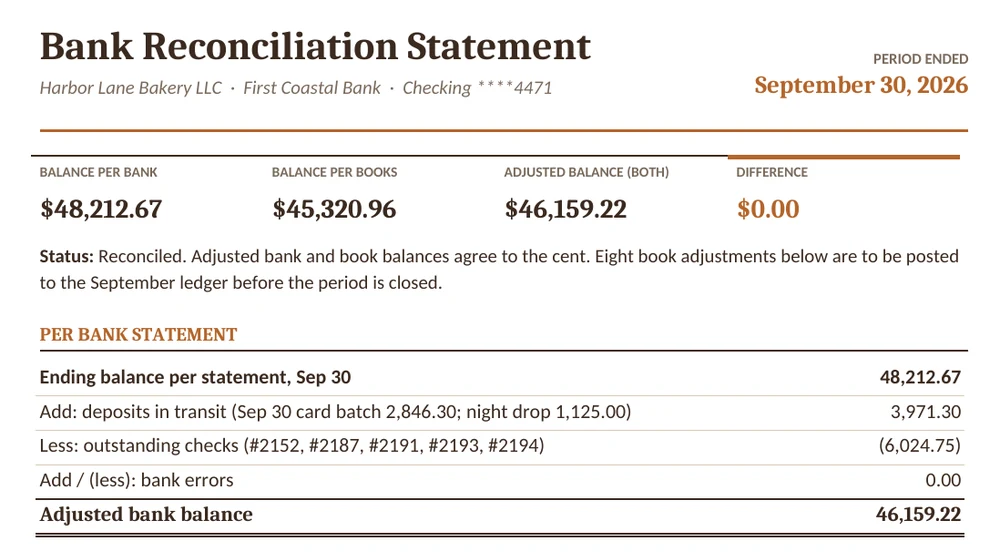
For the file, or for an owner or accountant who doesn’t want a spreadsheet, the Word template turns the same month into a short, signed statement: the four headline balances, both sides of the reconciliation, the journal entries, the items needing follow-up and a sign-off for the preparer and the reviewer.
When it still won’t balance
Some months the difference refuses to go away. Before you start re-checking every line, try these, roughly in order of how often they’re the answer:
- Last month didn’t actually reconcile. If the opening position was off, this month will be off by the same amount. Check the Monthly Log first.
- The difference matches a single item. Search the statement and the ledger for that exact amount. It’s usually something entered twice or not at all.
- The difference is exactly twice an item. Something was recorded with the wrong sign: a deposit entered as a payment, or the other way round.
- It divides by 9. A transposition, as in pass 3 above.
- Someone edited a closed month. A back-dated entry in the software changes the ledger balance you reconciled to. Compare the ledger balance today with the one written on last month’s reconciliation.
- The bank made the error. Rare, but it happens: another customer’s deposit, or a check cleared for the wrong amount. These are the only items that adjust the bank side. Call the bank and keep a note of the reference.
Whatever you do, don’t plug the gap with a miscellaneous entry to make it balance. A small unexplained difference this month is often a much bigger one hiding underneath it.
Questions people ask about bank reconciliation
How often should you reconcile a bank account?
At least monthly, when the statement arrives. Busy accounts, or businesses that have had cash problems, often reconcile weekly. The fewer transactions in each round, the faster errors are found.
Who should do it?
Ideally someone who doesn’t write checks or approve payments, with a second person reviewing and signing. In a very small business that may be the bookkeeper preparing and the owner reviewing, which is what the sign-off lines in the Word template are for.
My accounting software has a reconcile feature. Do I still need this?
The software does the matching well. What it doesn’t give you is a clear record that a person looked at the old outstanding items, approved the adjustments and signed off. Many businesses reconcile in the software and keep the one-page statement as their month-end record.
What do I do with a check that’s been outstanding for months?
Contact the payee first. If the check was lost, void it in the books and reissue it. If you can’t reach them, don’t simply write it off: most US states have unclaimed property rules that eventually require you to report and send the money to the state, so check the rules where you operate.
Where this fits in your month-end
A reconciled bank balance is the number every other report leans on. It’s the closing cash figure in your cash flow statement, it anchors the profit and loss statement because the fees and interest you just found belong there, and it’s the first thing an accountant checks before trusting a financial report. If unrecorded card fees keep turning up month after month, an expense report that logs them as they happen will make the next reconciliation shorter.
Start with one month. Type in two balances, list what’s in transit, read the statement for anything the bank did on its own, and see what’s left. It’s rarely as big as the number you started with.

![15+ Analysis Report Templates [Word & Excel]](https://www.reportsexcel.com/wp-content/uploads/2025/10/analysis-report-image.png)