

An employee attendance report template helps you record who was present, absent, on leave, sick or late every working day, and turns those daily marks into clear monthly totals and attendance percentages. Instead of chasing paper registers or messy spreadsheets, HR teams, managers and small business owners can see attendance patterns at a glance and act before absenteeism becomes a problem.
On this page you can download two free, fully editable templates that work together: an Employee Attendance Sheet in Excel with a dropdown for every day of the month, automatic totals and attendance % for each employee, and a Monthly Attendance Report in Word that summarizes attendance by department, absence reasons and employees who need follow-up – ready to send to management.
What Is an Employee Attendance Report?
An employee attendance report is a document that tracks the presence and absence of employees over a period – usually a week or a month. It shows the number of days each employee worked, the days they were absent and why (annual leave, sick leave, unpaid absence), late arrivals, half days and an overall attendance rate. The report gives HR and payroll accurate data and gives managers insight into workforce availability.
Attendance data also feeds into other HR documents. It is a key input for an employee performance report, it supports payroll and leave balances, and attendance rate is a common metric in a KPI report or monthly business report.
Why Track Employee Attendance?
Consistent attendance tracking protects both the business and its employees. A good attendance template helps you to:
- Pay people correctly – accurate working days, leave and half days for payroll.
- Reduce absenteeism by spotting frequent or patterned absences early.
- Plan staffing so shifts and projects are covered when people are away.
- Manage leave balances for annual leave and sick leave.
- Treat employees fairly with objective records instead of impressions.
- Meet legal and audit requirements for working time and leave records.
- Support performance reviews with reliable attendance history.
Free Employee Attendance Report Templates (Editable)
1. Employee Attendance Sheet Template (Excel)
This monthly employee attendance sheet in Excel is built for daily tracking. Enter the month and year once and the sheet automatically fills in the dates and weekdays for the whole month, with weekends highlighted. For each employee, choose an attendance code from the dropdown in each day cell: P (present), A (absent), L (leave), S (sick), HD (half day), LT (late), H (holiday) or WO (weekly off). Each code is colour-coded so the month is easy to read.
Totals are calculated automatically for every employee: days present, absent, leave, sick, half days, late arrivals, working days and attendance %. Anyone below 90% attendance is highlighted in red. A monthly summary shows the average attendance rate and the number of employees below target, and a bar chart compares attendance across the team.
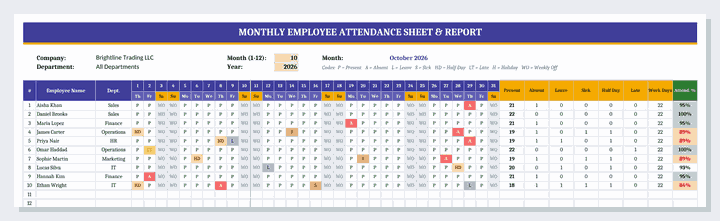
Best for: HR teams, office managers, supervisors, schools and small businesses that need a simple daily attendance tracker with automatic totals.
2. Monthly Attendance Report Template (Word)
This monthly attendance report template in Word turns raw attendance data into a summary for management. It starts with report details – company, department, reporting period, prepared by and date – followed by an overview of headcount, working days, average attendance rate, total absence days and late arrivals.
Further sections break down attendance by department, absence by reason (annual leave, sick leave, unpaid leave, unauthorized absence), employees requiring attention, late arrivals and early departures, and observations with recommended actions. A sign-off block for the HR manager and department head completes the report on a single page.
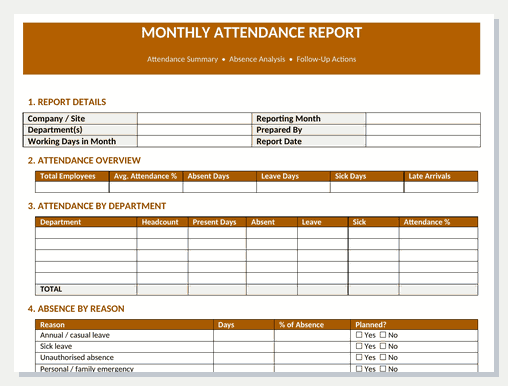
Best for: HR managers and department heads who need to report attendance trends to senior management each month.
What to Include in an Attendance Report
| Section | What it includes | Why it matters |
|---|---|---|
| Employee details | Name, employee ID, department | Identifies each record |
| Daily attendance | Status code for every working day | The source data for all totals |
| Absence types | Leave, sick, unpaid, unauthorized | Separates planned from unplanned absence |
| Late arrivals / half days | Count of late days and half days | Highlights punctuality issues |
| Totals and attendance % | Days present, days absent, rate | Feeds payroll and KPIs |
| Department summary | Average rate per team | Shows where absence is concentrated |
| Follow-up actions | Employees below target, next steps | Turns data into action |
| Approval | HR and manager sign-off | Confirms the record is accurate |
How to Create an Employee Attendance Report (Step by Step)
- Set the period. Choose the month and year in the Excel sheet so dates and weekdays update automatically.
- Add your employees. Enter names, IDs and departments in the employee columns.
- Mark weekends and holidays. Use WO for weekly offs and H for public holidays so they are not counted as working days.
- Record attendance daily. Select a code for each employee every day – recording daily is far more accurate than filling in at month end.
- Check the totals. Review days present, absences and attendance % for each employee.
- Summarize in the report. Copy the key figures into the Word monthly attendance report and complete the department and absence-reason tables.
- Follow up. List employees below target, note reasons and agree actions, then sign off and share the report.
Attendance Rate and Absenteeism Formulas
These standard formulas are used in the templates and are useful for any attendance analysis:
- Working days = Days in month − Weekly offs − Holidays
- Attendance rate % = (Days present + 0.5 × Half days) ÷ Working days × 100
- Absenteeism rate % = Days absent ÷ Working days × 100
- Unplanned absence % = (Sick days + Unauthorized absences) ÷ Working days × 100
- Average attendance = Sum of employee attendance rates ÷ Number of employees
Example: an employee with 22 working days who was present 19 days and took 1 half day has an attendance rate of (19 + 0.5) ÷ 22 = 88.6%, which is below a 90% target and would be flagged for a conversation. In the sample data in the Excel template, the team average is 93.0%, with 4 employees below 90%.
Tips to Improve Employee Attendance
- Publish a clear attendance and leave policy so everyone knows the rules.
- Record attendance every day and keep codes consistent.
- Look for patterns, such as frequent Monday or Friday absences, rather than single days.
- Hold return-to-work conversations after unplanned absences.
- Recognize and reward good attendance.
- Offer flexible working where possible to reduce unplanned absence.
- Document serious issues with an incident report and review them in the employee’s assessment.
Daily, Weekly or Monthly Attendance Reports?
Small teams and shift-based businesses often check attendance every day as part of a daily report, and supervisors may summarize it in a weekly report. For HR and payroll, the monthly attendance report is the standard because it matches the payroll cycle and makes trends easy to see. Many organizations also roll monthly figures into a quarterly or annual business report to track absenteeism over time.
Related Report Templates
- Employee Performance Report Templates – review goals, ratings and development plans.
- KPI Report Templates – track attendance rate alongside other key metrics.
- Daily Report Templates – record daily activities and staffing.
- Weekly Report Templates – summarize the week’s work and issues.
- Monthly Report Templates – report monthly business results.
- Incident Report Templates – document workplace incidents.
Frequently Asked Questions (FAQ)
What is an employee attendance report template?
An employee attendance report template is a ready-made Excel or Word document for recording employee presence, absences, leave, sick days and late arrivals, and calculating totals and attendance percentages for a period such as a month.
How do I make an attendance sheet in Excel?
Put employee names in rows and the days of the month in columns, add a dropdown list of attendance codes using Data Validation, then use COUNTIF formulas to total each code and calculate attendance %. The free Excel template on this page already includes automatic dates, dropdowns, colour coding, totals and a chart.
How do you calculate attendance percentage?
Divide the number of days present by the number of working days and multiply by 100. If you count half days, add half of them to days present first. For example, 20 days present out of 22 working days is 90.9%.
What is a good employee attendance rate?
Many organizations aim for an attendance rate of 95% or higher, and treat anything below 90% as a level that needs a conversation. The right target depends on your industry, leave policy and how holidays are counted.
What codes are used in an attendance register?
Common codes are P for present, A for absent, L for leave, S for sick, HD for half day, LT for late, H for holiday and WO for weekly off. The Excel template uses these codes and you can edit them to match your policy.
Can I use this attendance template for students or volunteers?
Yes. Replace the employee columns with student or volunteer names and adjust the codes. The sheet works for classes, training sessions, clubs and any group where you need to track daily attendance.
Are these attendance templates free and editable?
Yes. Both templates are free to download and fully editable in Microsoft Excel and Word, LibreOffice, Google Sheets and Google Docs. You can add employees, rename departments, change the target percentage and add your company logo.

![17+ Quality Audit Report Templates [Word Excel]](https://www.reportsexcel.com/wp-content/uploads/2025/09/quality-audit-report.png)
You must be logged in to post a comment.