

Three weeks after a wet Wednesday in October, the owner’s rep sends an email: why did the Level 3 slab finish two days late? The superintendent can’t remember that Wednesday in any detail. Nobody could.
The daily report can. Rain and wind stood the tower crane down from 8:00 to 10:00. The city inspector arrived 45 minutes late for the pre-pour deck inspection. RFI-087 was still waiting on the engineer, which held up the plumbing risers in Shaft P2. That’s 4.25 hours of documented delay, with times, names and a responsible party next to each one. One reply, attached PDF, question closed.
That is what a construction daily report is really for. It isn’t busywork. It’s the one record written on the day by someone who was standing on the slab, and months later it’s usually the document that settles arguments about time, money and safety. Below you’ll find a free construction daily report template in Excel and Word, a walk-through of a real filled-in day, and the habits that make a daily log hold up when somebody finally reads it closely.
Download the Templates
Both files use the same sample day, Report No. 163 on a medical office building job, so you can see how they line up. The Excel file is the working log your super or foreman fills in on site. The Word file is the version you send to an owner, architect or lender, where it needs to read well.
Excel: Construction Daily Report + Monthly Log
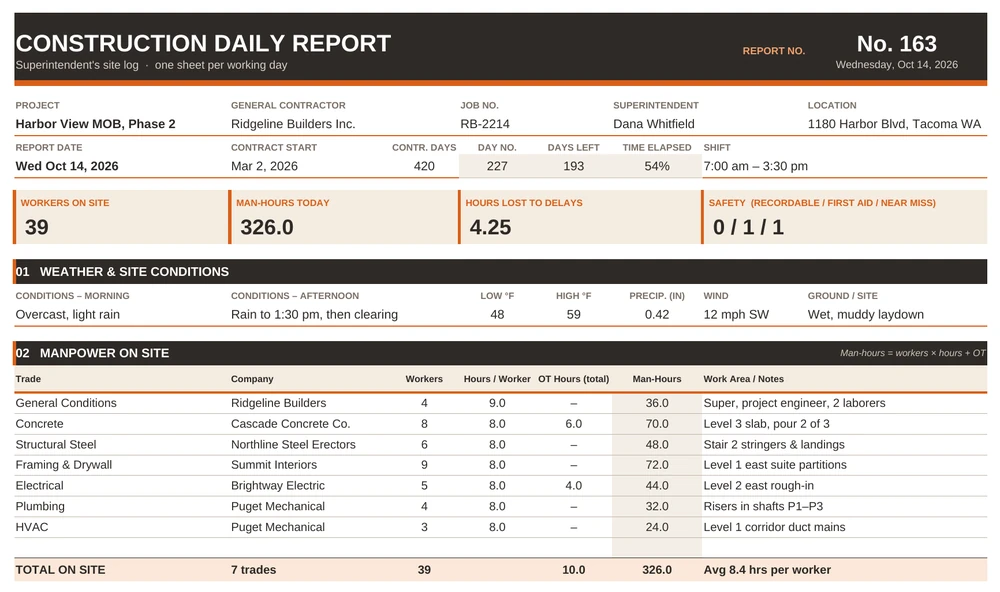
The Daily Report sheet is a single printable form split into eight numbered sections: weather, manpower, equipment, work performed, materials delivered, delays and RFIs, safety and visitors, and a look-ahead with sign-off. Type over the white cells. The shaded cells do the math for you:
- Report number counts working days since contract start with
=NETWORKDAYS(B8,A8), so you never have to track it by hand. - Day of contract, days left and time elapsed come from the report date, start date and contract duration.
- Man-hours for each trade are
=C19*D19+E19: workers × hours each, plus total overtime hours. - Equipment utilization is hours used ÷ (used + idle), and anything under 60% turns orange.
- Hours lost totals every delay line, and a small check warns you if toolbox talk attendance is lower than the headcount.
The four cards at the top (workers on site, man-hours, hours lost and safety events) update on their own. A second tab, Monthly Log, keeps one line per working day with month-to-date totals and averages; the last row pulls today’s numbers straight from the Daily Report sheet.
Word: Daily Site Report
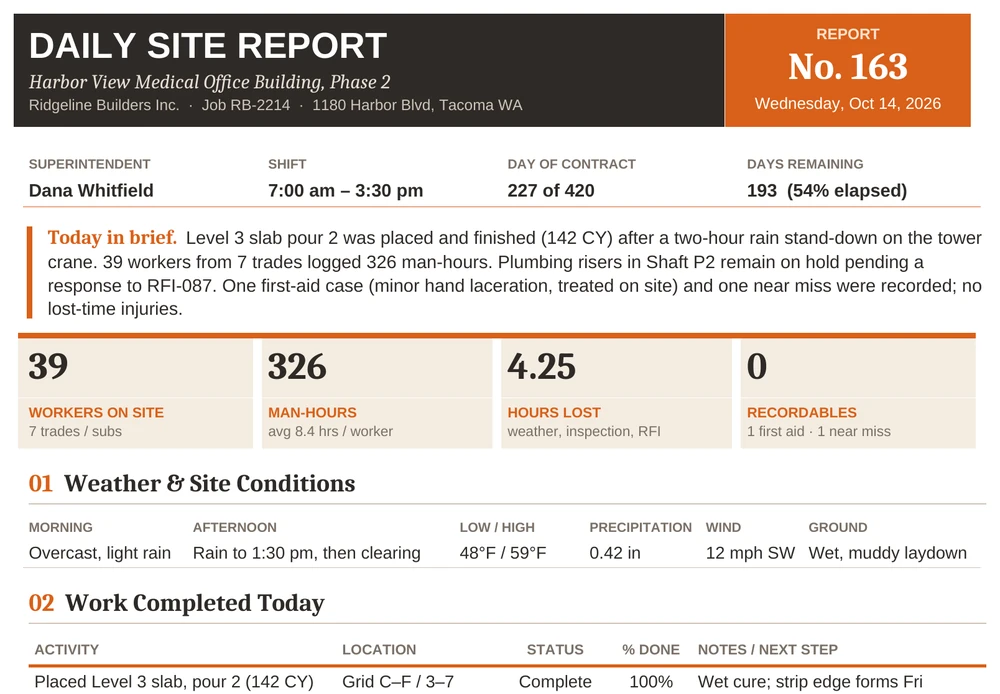
Same day, written up for people who weren’t there. It opens with a short “today in brief” summary and four headline numbers, then works through weather, work completed, manpower, equipment, deliveries, delays and open RFIs, safety and visitors, and the next two days. Page three is a photo log with captioned boxes; drop your own photos in and keep the captions specific.
Not on a construction job? The general daily report template suits offices, service crews and shift teams, and the daily progress report templates focus on percent complete rather than site conditions.
What Belongs on the Page
Whether you use our file or build your own, check that it captures these ten things. Skip one and that’s exactly where the gap will show up in a claim file.
- Project, date and report number. Numbered reports make it obvious when one is missing.
- Weather, morning and afternoon. Temperature, rain in inches, wind and ground conditions, not just “rain.”
- Manpower by trade and by company. Headcount, hours and overtime for each sub.
- Equipment on site. What ran, and what sat idle.
- Work performed, by location. Gridlines, levels or rooms, so progress can be traced later.
- Deliveries. Material, quantity, supplier and the ticket number.
- Delays and open issues. Cause, start and stop times, hours lost and who is responsible.
- Safety. Toolbox talk topic and attendance, recordables, first aid cases and near misses.
- Visitors and inspections. Who came, when, and the result.
- Photos and a signature. Dated, captioned photos, and the name of the person who stands behind the report.
One Day, Filled In: Report No. 163
Here’s how the sample report reads, section by section, so you can see what “good enough” looks like.
Weather. Overcast with light rain in the morning, rain until 1:30 pm, then clearing. 48°F low, 59°F high, 0.42 inches of rain, wind 12 mph from the southwest. The laydown area turned to mud. None of that is dramatic, but it explains the crane stand-down and the skid steer hours.
Manpower. 39 workers from seven trades. Concrete had 8 people on 8-hour days plus 6 overtime hours to finish the pour, so 8 × 8 + 6 = 70 man-hours. Add up every trade and the day comes to 326 man-hours, or about 8.4 hours per worker. If a sub later invoices for 12 concrete finishers that day, you have the number.
Equipment. This is where the report quietly saves money. The figures from the sample day:
| Equipment | Used | Idle | Utilization | What it tells you |
|---|---|---|---|---|
| Tower crane | 6.5 hrs | 2.0 hrs | 76% | Weather stand-down, documented |
| Concrete pump | 5.0 hrs | 1.0 hrs | 83% | A short wait for the crane to resume picks |
| Telehandlers (2) | 9.0 hrs | 7.0 hrs | 56% | One unit is barely needed |
| Scissor lifts (4) | 18.0 hrs | 14.0 hrs | 56% | Send one back; it goes off-rent Friday |
| Skid steer | 3.0 hrs | 5.0 hrs | 38% | Mud cleanup only |
Work performed. Six activities, each with a location, a status and a percent complete. The plumbing risers are marked Behind, which the template highlights, and the note points to RFI-087. Someone reading it a month later can join the dots without calling anyone.
Delays. Three entries: 2.00 hours for weather, 0.75 hours for the late inspection and 1.50 hours for the open RFI, 4.25 hours in total, with one item still open. Each has a cause and a responsible party, which is what turns a complaint into a time-extension request.
Safety. The toolbox talk covered working around concrete pumps and booms, with 39 attendees, matching the headcount. No recordables, one first-aid case (a minor hand cut, treated on site) and one near miss (an unsecured load on telehandler forks). Near misses are worth writing down. They’re the cheapest safety lessons you’ll ever get.
The bigger picture. On the Monthly Log tab, ten working days in, the job has logged 2,928 man-hours, four days with delays and 9.25 hours lost. That’s the kind of summary a PM can paste straight into a weekly status report or a monthly project status report without digging through ten separate files.
Six Mistakes That Make a Daily Report Useless
- Writing it tomorrow morning. By then the times are guesses. Block 15 minutes before you leave the site and finish it while the details are fresh.
- “Rain” with no times. A delay claim needs a start, a stop and the work it stopped. “Rain 8:00–10:00, crane picks suspended” is evidence. “Rainy day” isn’t.
- Counting heads but not companies. “35 workers” doesn’t help when two subs dispute who was on site. List each company and its headcount.
- Leaving out what didn’t happen. Idle equipment, crews waiting on an inspection and work you couldn’t start matter as much as the work that got done.
- Opinions instead of facts. “The inspector was useless” will be read aloud at a deposition one day. “Inspector arrived 7:45; inspection was booked for 7:00” won’t hurt anyone.
- Photos with no captions. A folder of 60 photos called IMG_4471.jpg proves nothing. Date them, say where they were taken, and tie them to the report number.
Who Fills It Out, and When
On most jobs the superintendent owns the daily report. On larger projects each foreman or sub submits their own sheet and the super rolls them into one. Either way, one person signs it, and the PM reviews it within a day or two.
The rhythm is simple: notes and photos during the day, the report written at the end of the shift, a PDF to the project file that evening, and a weekly bundle to the owner. When something bigger happens, the daily report just flags it and points to the full document. Injuries go on a separate incident report, formal checks get their own inspection report, and owner or consultant walkthroughs can be written up with a site visit report.
Working from a tablet? The Excel file opens in the Excel app and in Google Sheets, and the formulas it uses (NETWORKDAYS, SUM, COUNTIF and IF) work in both. Set it up once with your company name, contract start date, contract days, your usual subs and your regular equipment, then save it as a master. Each morning, copy the sheet (right-click the tab, then Move or Copy, then Create a copy), change the date, and you’re only typing what changed.
One more practical tip: name the files the same way every time, such as 2026-10-14_Daily-163.pdf. They’ll sort by date on their own, and a missing number jumps out.
Before You Hit Send: A 60-Second Check
- Headcount in the manpower table matches the toolbox talk sign-in (the Excel template flags a mismatch).
- Every delay line has a cause, start and stop times and hours lost.
- Open RFIs, change orders and submittals are referenced by number.
- Delivery ticket numbers match the paper tickets in the job box.
- Photos are dated, captioned and saved with the report number.
- The look-ahead lists any inspections you’ve requested for the next two days.
- The report is signed, saved as PDF and filed under the right date.
That’s it. A good construction daily report is a bit boring to write and surprisingly valuable to read later. Fill it in every working day, keep it factual, and when that email about the late slab shows up, you’ll be able to answer it in five minutes.

![15 Status Report Templates [ WORD ]](https://www.reportsexcel.com/wp-content/uploads/2025/10/status-report-image.png)