

Brightwater Foods Distribution isn’t a real company, but anyone who has run accounts payable at a small wholesaler will recognize it. Twelve trucks, about forty restaurant and grocery customers, a few dozen suppliers, and one AP clerk. That clerk, Dana, spent the summer paying whichever supplier phoned most recently.
By the end of August, Brightwater had paid $212.40 in late fees in a single month. It had missed early-payment discounts on its biggest dairy account, and one produce supplier had warned it was about to put the account on credit hold. The cash was there. The problem was that nobody could see, in one place, who was owed what and how late it was.
This is how an accounts payable aging report fixed that, using the two free templates on this page. The Excel workbook ages every open bill automatically. The one-page Word summary turns it into a payment decision the owner can sign off.
The situation in September
Dana’s starting point was a folder of supplier invoices, a bank login and a sticky note of “who’s chasing us”. There was no list of what was due when. There were 13 unpaid bills across eight suppliers, worth almost $90,000 in total, but nobody knew that number until the template added it up.
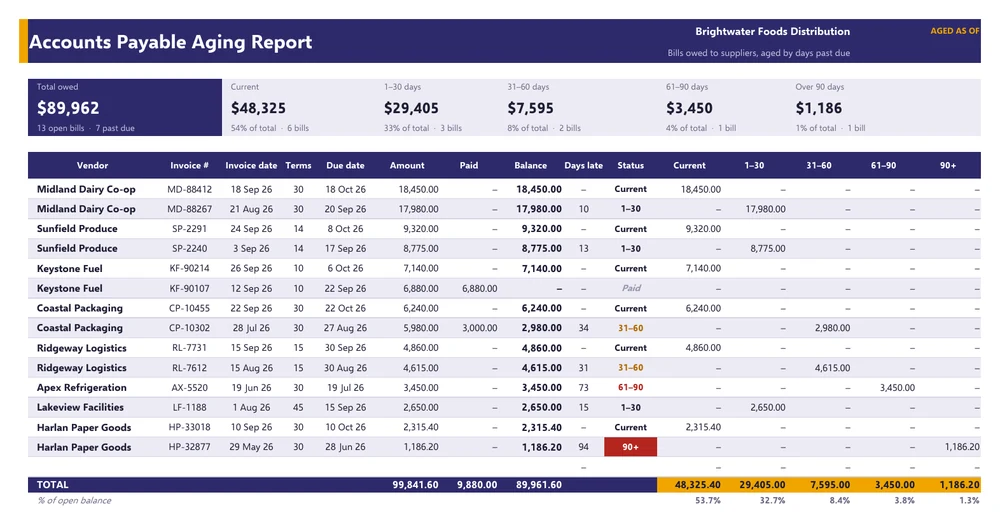
The first job was to type each open invoice into the AP Aging tab: vendor, invoice number, invoice date, payment terms in days, amount, and anything already paid. That took about forty minutes. Everything else on the sheet is calculated:
- Due date is the invoice date plus terms.
- Days late is how far the “aged as of” date is past the due date. Change that one date at the top and the whole report re-ages.
- Status drops each bill into Current, 1–30, 31–60, 61–90 or 90+ days. The 90+ bucket shows in red, so it’s hard to ignore.
- Discount columns show the deadline for any early-payment discount. It’s highlighted in amber while it’s still open and struck through once it’s missed.
What the aging report showed
Once everything was in, the tiles across the top told the story in one line:
| Bucket | Amount | Share | Bills |
|---|---|---|---|
| Current (not yet due) | $48,325.40 | 54% | 6 |
| 1–30 days late | $29,405.00 | 33% | 3 |
| 31–60 days late | $7,595.00 | 8% | 2 |
| 61–90 days late | $3,450.00 | 4% | 1 |
| Over 90 days | $1,186.20 | 1% | 1 |
| Total open | $89,961.60 | 13 |
Nothing about that table is a crisis. More than half the balance isn’t even due yet, and 86% is either current or less than a month late. But it was the first time anyone at Brightwater had seen the picture as a whole, and three problems jumped out once it was there.
Problem 1: the biggest bill was paid on noise, not on schedule
Midland Dairy Co-op is Brightwater’s largest supplier at roughly $18,000 a month. Its terms are 2/10 net 30: take 2% off if you pay within ten days, otherwise the full amount is due in thirty. August’s invoice was paid only when Midland’s credit team called, twenty days after the discount window had closed. September’s invoice, MD-88412, had already missed its discount deadline of September 28, because the paper copy reached Dana on day eleven.
That’s $369 gone on one invoice. Over a year it’s about $4,300, and that’s from a single supplier. Paying ten days early to save 2% is worth roughly a 37% annual return on the cash, which beats anything else a small distributor can do with it.
Problem 2: the bills that were actually costing money were sitting quietly
Ridgeway Logistics charges 1.5% a month on overdue balances, and invoice RL-7612 was 31 days late. Coastal Packaging had an agreed balance of $2,980 still unpaid after a part-payment in August. Neither supplier had phoned, so neither had been paid. The suppliers who were quiet weren’t necessarily patient. Some of them were just charging interest.
Problem 3: the oldest bills weren’t really bills yet
The 90+ item was a $1,186.20 paper-goods invoice that had never been approved, because nobody could find the delivery receipt. The 61–90 item was a $3,450 refrigeration repair that Brightwater disputed: it was the second call-out for the same compressor fault. Paying either one would have been a mistake. Leaving them to age without a note was a mistake too.
What changed: a weekly payment run
The fix wasn’t paying everything. It was deciding in what order. The By Vendor tab in the workbook does most of that thinking. It totals each supplier’s balance by bucket, finds their oldest open bill, and suggests an action:
| Rule in the template | Suggested action | Applied at Brightwater |
|---|---|---|
| Notes start with “DISPUTED” | Hold: resolve dispute first | Apex Refrigeration |
| Anything over 90 days | Pay or query now | Harlan Paper Goods (query: missing receipt) |
| 31–90 days late | Pay this week | Ridgeway, Coastal Packaging |
| 1–30 days late | Pay in next run | Midland, Sunfield, Lakeview |
| Not yet due | Pay on due date | Keystone Fuel |
Dana then applied two bits of judgment the formulas can’t. First, anything with an open discount moves to the front of the queue: Coastal’s 1% on CP-10455, worth $62.40 if paid by October 2. Second, Midland and Sunfield were paid this week anyway, even though they’re only 10 and 13 days late. One is the main supplier and the other had threatened a credit hold. A template should make the decision easier. It shouldn’t make it for you.
The one-page summary for the owner
The owner didn’t want a 14-row spreadsheet. He wanted to know how much was going out, why, and what was being held back. That’s the Word template:
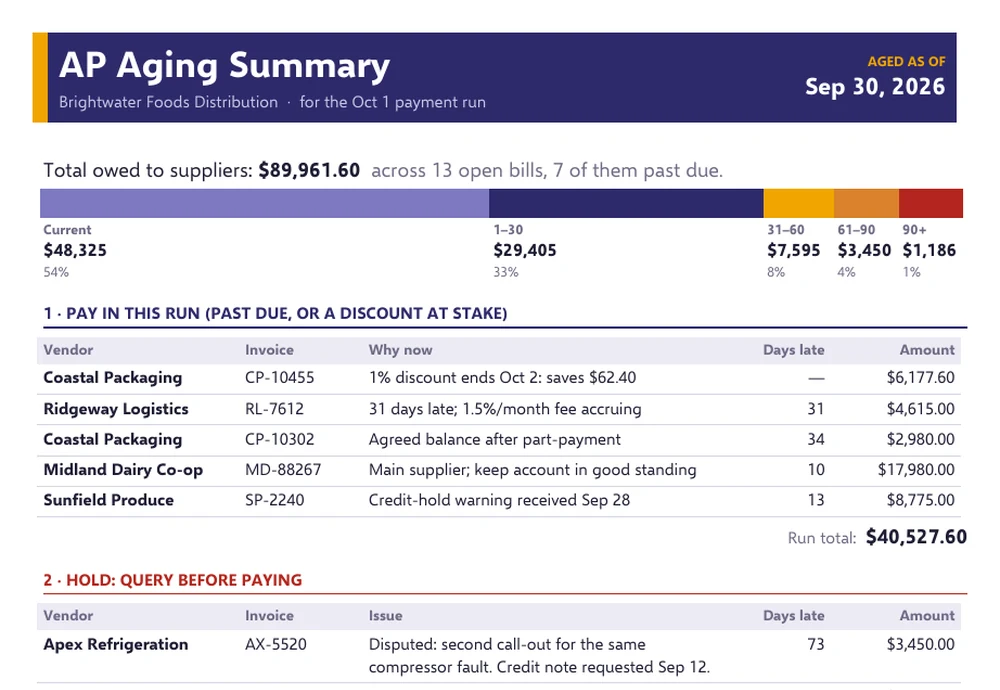
It has three sections and fits on one page. Pay in this run lists five invoices totaling $40,527.60, each with a one-line reason. Hold lists the disputed repair and the unapproved invoice, with what’s being done about each. What changed is four bullet points comparing this run with last month: late fees, missed discounts, the over-90 balance, and what’s due before the next run. There’s a signature line at the bottom, because a payment run someone has approved is a control, and one nobody approved is just a habit.
Results after one month (illustrative)
- Late fees: $212.40 in August, nothing in September.
- Over-90 balance: down from $4,980.55 to $1,186.20 after old Lakeview and Harlan items were matched and paid. The one left over is under query.
- Discounts: one captured (Coastal), one missed (Midland, because of invoice routing). The fix is simple: Midland now emails invoices straight to the AP inbox.
- Time: about 30 minutes every Tuesday to update the workbook and fill in the summary, instead of a scramble every time the phone rang.
If you’re setting this up yourself
A few things Brightwater learned that apply to almost any small business:
- Age from the due date, not the invoice date. A 30-day bill that’s 20 days old is current. The template ages from the due date, the same as most accounting software’s “days past due”.
- Run it on the same day each week. AP aging is only useful if it’s fresh. Change the “aged as of” date and everything re-sorts.
- Write notes. “Disputed”, “part-paid” and “never approved” turn a list of numbers into a list of decisions. The By Vendor tab looks for “DISPUTED” at the start of a note to hold that supplier automatically.
- Keep the vendor names identical. The vendor summary uses exact matches. “Coastal Packaging” and “Coastal Packaging Inc” count as two suppliers. A check cell at the bottom tells you if the totals don’t tie.
- Look at the other side, too. AP aging shows what you owe. The accounts receivable aging report shows what customers owe you. Putting the two next to each other is the simplest cash forecast there is.
When paying suppliers on time starts to squeeze cash, the next step is a proper cash flow statement, plus a budget report to see whether the pressure is timing or something more structural. For most small businesses, though, the aging report alone ends the phone-call method of paying bills. Usually that’s enough.

![16+ Sample Expense Report Templates [in EXCEL & WORD]](https://www.reportsexcel.com/wp-content/uploads/2026/08/27f3ee2a-e8a3-4885-b3c0-5099324c42aa-120x120.jpg)