

Most social media reports are a stack of screenshots from five different apps, pasted into slides the night before they’re due. Nobody reads them past slide three.
You can do better in about an hour a month. A useful social media report fits on one page, uses the same numbers every month, and tells the reader three things: did we grow, did people care, and did any of it lead to sales? Below is the five-step routine I’d use, plus a free social media report template in Excel and Word, filled in with a month of sample data from a small coffee roaster.
1. Choose five numbers and stick with them
Every platform will happily show you forty metrics. Pick a small set that you can pull from every channel, and report them the same way every month:
- Followers at the start and end of the month (net new and growth % are calculated).
- Reach: unique accounts that saw your content. Impressions are worth logging too, but reach is the better base for rates.
- Engagements: likes, comments, shares, saves and replies.
- Link clicks to your site.
- Conversions: orders, sign-ups or leads you can trace to social, usually through UTM-tagged links.
That’s it. Posts published and ad spend go in too, as context. Anything else belongs in a deep-dive, not the monthly report.
2. Pull the data on the same day every month
Pick a day, such as the first working day of the month, and export from each platform’s own analytics: Meta Business Suite for Instagram and Facebook, TikTok Studio, LinkedIn page analytics, YouTube Studio. Conversions come from your web analytics.
Platforms sometimes revise recent numbers for a few days, so pulling on the same day keeps your months comparable. Write down where each number came from in a notes cell. Six months from now, someone will ask.
3. Compare channels with rates, not totals
TikTok reached 251,400 people for the sample brand in September. LinkedIn reached 8,700. Comparing those totals is meaningless. Comparing rates isn’t:
| Channel | Reach | Engagement rate | Click-through | Conversions |
|---|---|---|---|---|
| 96,300 | 7.60% | 0.86% | 64 | |
| TikTok | 251,400 | 7.54% | 0.24% | 31 |
| 41,800 | 3.49% | 1.21% | 38 | |
| 8,700 | 7.01% | 2.75% | 6 | |
| YouTube | 22,600 | 5.49% | 0.63% | 9 |
Now there’s a story. TikTok and Instagram get similar engagement, but Instagram turns attention into clicks at more than three times the rate and brings in twice the conversions. Facebook barely engages anyone, yet it still sends traffic. LinkedIn is tiny and has the best click-through of the lot.
The template uses engagement rate = engagements ÷ reach and click-through = link clicks ÷ impressions. Some tools divide engagements by followers or by impressions instead. Any of them is fine as long as you pick one, label it on the report and never switch quietly.
4. Put this month next to last month and next to the goal
A number with nothing to compare it to is just trivia. The template gives each headline metric two comparisons:
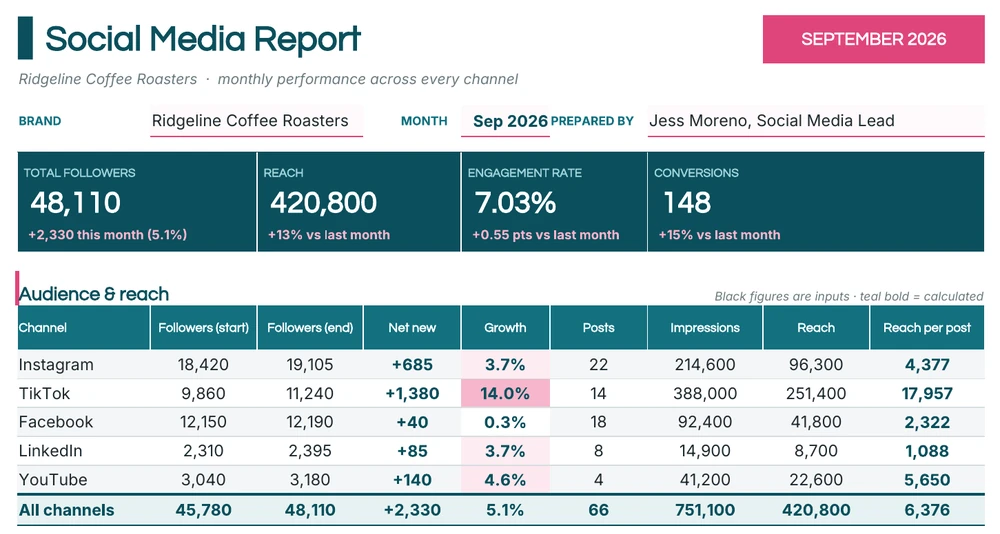
- Versus last month: reach was up 13%, engagement rate rose from 6.48% to 7.03% (+0.55 points), and conversions went from 129 to 148.
- Versus the goal: four monthly targets with a status that calculates itself. In the sample, followers (48,110 against 48,000) and engagement rate (7.03% against 7.0%) are marked as hit, while link clicks are 9% short and conversions 1% short.
Write rate changes in percentage points, not percent. “Engagement rate up 8.5%” and “engagement rate up 0.55 points” describe the same change, but only the second is hard to misread.
For the bigger picture, a 12-Month Trend tab keeps one row per month. September’s row pulls straight from the monthly report, and a column chart of reach shows the shape of the year. Here it’s the expected January dip after a busy December, then growth (apart from a small dip in June) to a record September.
5. Write three sentences someone will actually read
The numbers are for you. The summary is for your boss, client or owner. Open the report with a short paragraph that answers “so what?” Here’s the sample brand’s:
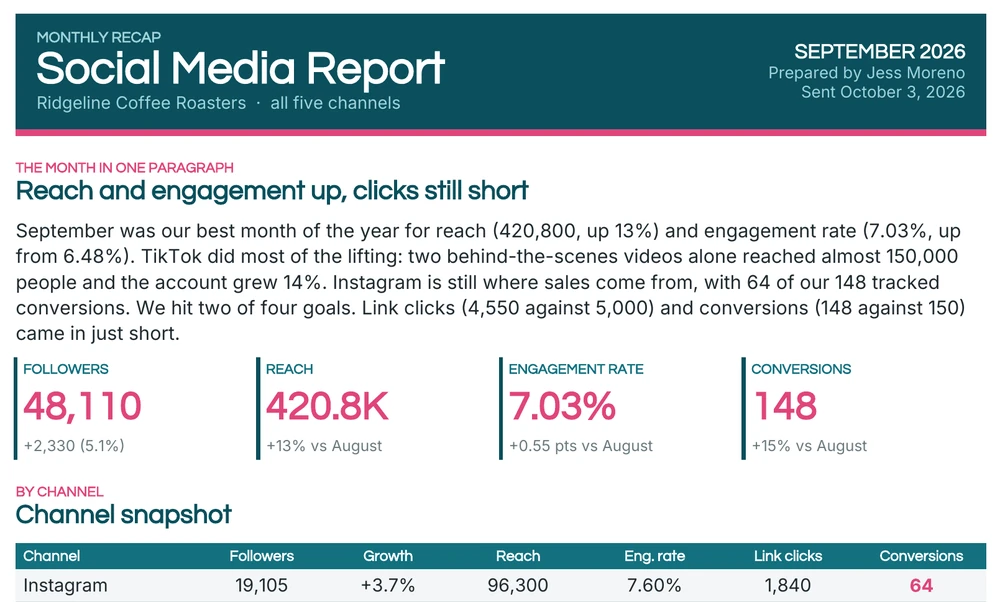
“September was our best month of the year for reach and engagement rate. TikTok did most of the lifting. Instagram is still where sales come from. We hit two of four goals; clicks and conversions came in just short.”
Then add what worked, what didn’t, and what you’ll do next month, with an owner for each action. The Word template is set up exactly that way.
The templates
Excel: Social Media Report + 12-Month Trend
The Monthly Report tab has four headline cards (followers, reach, engagement rate, conversions), an audience and reach table, an engagement and results table, the month-on-month and goals blocks, and a top-posts table ranked by engagements. You type in the raw numbers for each channel. Net new followers, growth, reach per post, engagement rate, engagements per post, click-through and cost per conversion are all formulas, shown in bold teal. The best engagement rates are highlighted, and growth gets a pink color scale so the fastest-growing channel is easy to spot.
Five channels are set up (Instagram, TikTok, Facebook, LinkedIn and YouTube). Rename any row to Pinterest, Threads, X or whatever you use. The totals don’t care what the rows are called.
Word: Social Media Monthly Recap
A two-page write-up of the same month: a summary paragraph, four headline figures, a channel snapshot table, wins worth repeating, the top five posts, misses and what was learned, next month’s plan with owners and goals, and a short note on how each metric is measured. Send it as a PDF, or paste the sections into an email.
Metric cheat sheet
Keep this near the template so everyone on the team calculates things the same way.
| Metric | Formula used in the template | Watch out for |
|---|---|---|
| Net new followers | Followers end − followers start | Follower purges by the platform can make a month look bad |
| Follower growth | Net new ÷ followers start | Small accounts swing wildly in percentage terms |
| Engagement rate | Engagements ÷ reach | Some tools use followers or impressions as the base |
| Engagements per post | Engagements ÷ posts | Rewards fewer, better posts. That’s usually the right call |
| Click-through rate | Link clicks ÷ impressions | Platforms without clickable links (TikTok, Instagram feed) will always look weak |
| Cost per conversion | Ad spend ÷ conversions | Includes organic conversions unless you separate paid ones |
Reporting to a client? Change two things
If you run social for clients, the template works as it is, with two adjustments.
Agree on the goals before the month starts. Put the targets in the goals block on day one and send the client a copy. A report that says “we hit 2 of 4 goals” is only fair if they agreed to those four goals in advance. Otherwise you’ll spend the review call debating whether 7% engagement is good instead of what to do next.
Lead with their business, not your platform metrics. A café owner cares about orders and footfall more than reach. Make conversions the first number they see (it already has its own headline card in the template) and talk about clicks and conversions before followers. Keep the channel tables. They show your working, and the client’s marketing manager will want them. But the summary paragraph should start with what the month did for the business.
One more thing: send the Word recap as a PDF, and keep the Excel file yourself. Clients forward reports, and you don’t want your formulas, notes or ad spend columns traveling with them.
Where this report fits
Social is one part of marketing, so this report usually feeds a bigger one. Roll the headline numbers into a monthly marketing report alongside email, search and paid campaigns, or track a couple of them, such as engagement rate and conversions, on a KPI report. If social drives most of your online orders, put the conversion figures next to your sales report so the two teams are looking at the same numbers. Running a launch or a busy season? A short weekly report with just reach, clicks and conversions keeps everyone up to date between the monthly reports.
Last tip: when you start a new month, copy the Monthly Report tab, paste last month’s trend row as values, and update the inputs. The whole routine should take an hour. Spend the time you save on the posts themselves.

![15+ Project Report Templates [WORD & EXCEL]](https://www.reportsexcel.com/wp-content/uploads/2025/10/project-image.png)