

You’ve listed every account, added both columns, and the debits come to $207,977 while the credits come to $207,077. A trial balance is meant to show those two numbers as equal, and when they aren’t, it tells you something is wrong without saying where. This guide is for that moment. It works through the faults in the order they’re worth checking, explains what each looks like in the numbers, and ends with the free trial balance template: an Excel worksheet that runs these checks for you, and a clean Word version for the file.
The sample books belong to Brightwater Plumbing Co., an illustrative three-van plumbing business, at 30 September 2026. The workbook includes a practice tab with one planted error, the same one used in the examples below, so you can try the method on real numbers before you need it.
Before you start: read the difference, not the totals
Subtract the smaller total from the larger one. That number is the most useful clue you have, more useful than either total. Write it down, note which side is higher, then work through the checks below in order. They’re arranged from cheapest to most expensive: the first few take seconds, and the last one means going back through the ledger line by line.
In the practice tab, debits are higher by 900.
Check 1: Is the difference divisible by 9?
What it points to: a transposition (two digits swapped, like 4,590 keyed as 5,490) or a slide (a decimal point moved, like 459.00 instead of 4,590.00).
Why it works: swapping two digits always changes a number by a multiple of 9. So does moving the decimal point. It’s a quirk of base-10 arithmetic, and it’s the fastest test there is. In the template, the formula is =MOD(ROUND(ABS(diff)*100,0),9)=0. Multiplying by 100 first means it also catches swaps in the cents.
Narrowing it down: divide the difference by 9. The answer tells you roughly where to look. For Brightwater, 900 ÷ 9 = 100. That points to a swap between the hundreds and thousands digits where those two digits differ by 1, such as 4,5xx and 5,4xx. Scan the debit column for a balance that fits and one stands out: Office and phone at 5,490. The ledger says 4,590. That’s the planted error.
Fix: correct the figure on the trial balance if that’s where the typo happened. If the ledger itself is wrong, correct the ledger and re-pull the balance.
Check 2: Is half the difference equal to a balance?
What it points to: a balance listed on the wrong side, a debit entered as a credit or the other way round.
Why it works: moving an amount from one column to the other removes it from one side and adds it to the other, so the gap is twice the amount. If Brightwater’s sales tax payable (1,862) had been put in the debit column, debits would be higher by 3,724. Half of that is 1,862, and there’s the account.
The quick tell: look for an account sitting on the side that’s unusual for its type. Accumulated depreciation, payables, loans and revenue normally carry credit balances. Drawings, assets and expenses normally carry debits. The template searches both columns for an amount equal to half the difference and names the account if it finds one.
Check 3: Does the difference match a balance exactly?
What it points to: an account that was left off the list, or listed twice.
Why it happens: new accounts get added to the ledger mid-year and nobody adds them to the trial balance list. Accrued wages is a classic, because it’s often zero for 11 months of the year. Duplicates happen when a list is rebuilt by copying rows. In the template, the diagnostics name the matching account, for example “Interest may be listed twice or left out”.
Fix: compare the account count on the trial balance with the count in your chart of accounts. If they differ, you’ve found the problem.
Check 4: Is it a round 10, 100 or 1,000?
What it points to: an addition error, usually a carried digit, especially if the columns were added by hand or on a calculator.
Fix: re-add both columns. In a spreadsheet, check that the SUM range covers every row. A total that stops one row short, because someone inserted a row below it, is the spreadsheet version of a carry error and it’s far more common. The template’s totals cover the whole account block, so rows inserted inside the block are picked up.
Check 5: Do the adjustments balance on their own?
What it points to: a one-sided adjusting entry. If the ledger balances but the adjusted trial balance doesn’t, the problem has to be in the adjustments columns.
Brightwater has three adjustments for September: depreciation of 850, wages of 2,340 earned on 26–30 September but paid on 3 October, and 600 of prepaid insurance used up. Each one has a debit and an equal credit. The diagnostics check the adjustment columns separately (“Adjustments balance? Yes”), so a one-sided entry gets caught here and doesn’t get mixed up with errors in the ledger balances.
Check 6: Still nothing? Re-pull the balances
If none of the tests point anywhere, the difference is probably made up of more than one error, and they’re interfering with each other’s patterns. Stop testing and compare each trial balance figure with its ledger account, one at a time, ticking as you go. Start with the busiest accounts (cash, receivables, payables, revenue), because that’s where most errors are.
Check the ledger as well. A trial balance can only be as good as the ledger behind it. If one posting in the ledger has a debit without a matching credit, the trial balance will be out of balance however carefully you copied it. Reconciling the cash account to the bank with a bank reconciliation is the quickest way to rule out the biggest account.
It balances. Is it right?
Not necessarily. A trial balance only proves that the debits equal the credits. Four kinds of error slip straight through:
| Error | Example | How you’d catch it |
|---|---|---|
| Omission | A supplier invoice never entered at all | Supplier statement review; AP cut-off check |
| Wrong account (commission) | Fuel posted to Office and phone | Review expense accounts for odd month-on-month swings |
| Wrong type (principle) | A new van posted as an expense | Capitalization policy; review large expenses |
| Compensating errors | +$200 in one place, −$200 in another | Account-by-account reconciliation |
This is why the adjusted trial balance is where reviews start, not where they finish. Look for balances on the wrong side, accounts that are unexpectedly zero, and expenses that look out of line with last month. Accrued wages showing nothing at a quarter end, for example, usually means a missing adjustment. If you run payroll on a different cycle from the month end, the payroll report gives you the figures for the accrual.
Run the checks on your own difference
Six checks is a lot to keep in your head at month-end. Enter your two totals, and optionally paste your account balances, and this runs the quick ones for you.
The divisible-by-9 test is done on the difference in cents, so it also catches swapped cents. These checks point you where to look; they don’t prove what the error is.
The Excel trial balance worksheet
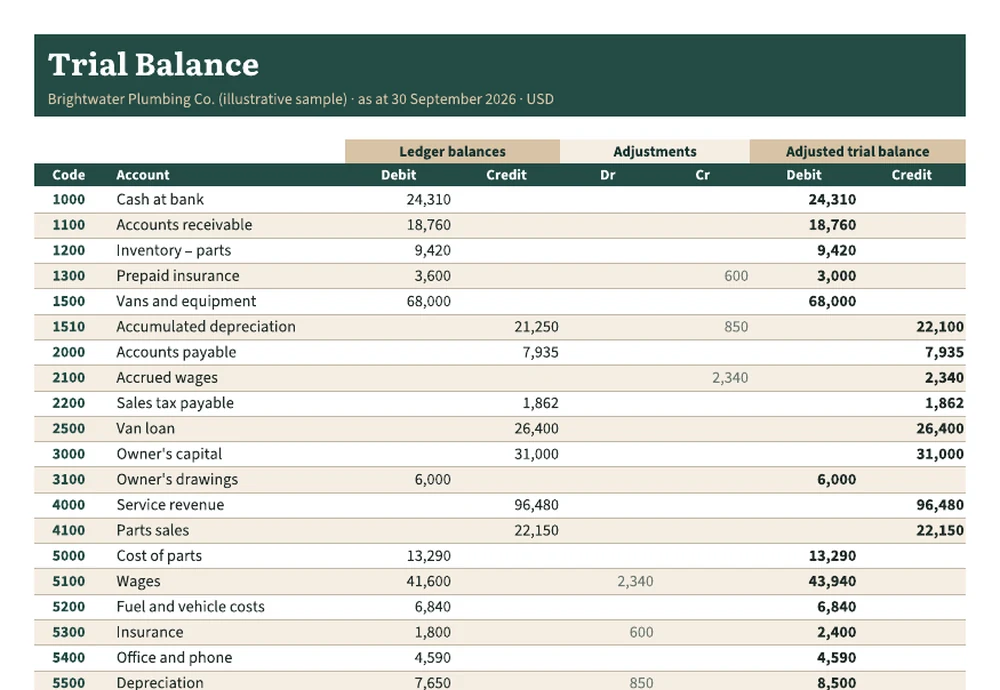
The worksheet uses the classic three-stage layout: ledger balances, then adjustments, then the adjusted trial balance. You enter the first four columns. The adjusted columns calculate the net of each row and place it on the correct side, so a credit-heavy row never ends up as a negative debit. Below the table, the diagnostics panel shows the difference for both stages, checks that the adjustments balance, and runs checks 1 to 4 from this guide automatically. Anything that needs looking at turns red.
The Practice – Unbalanced tab is the same set of books with the Office and phone balance transposed. The panel flags “divisible by 9” and shows that debits are higher. Use it to see how the checks behave. You can also plant errors of your own, put a balance on the wrong side, say, and watch check 2 name the account.
The Word trial balance report
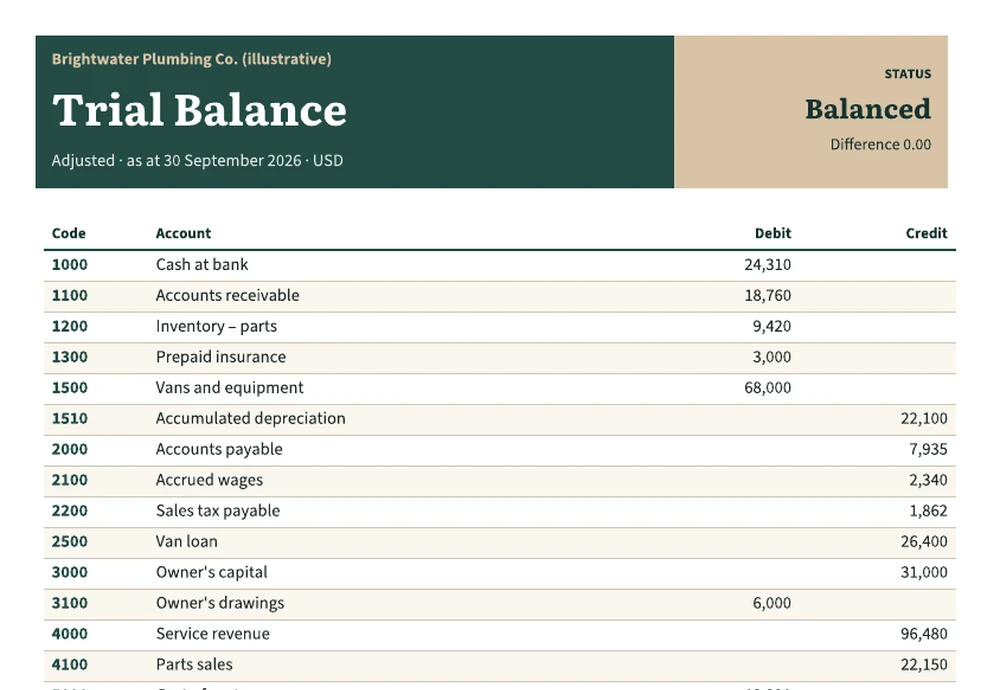
When the worksheet balances, the Word version is the copy for the file, your accountant or a lender. It fits on one page and shows the adjusted balances only, with a status panel at the top and the adjusting entries listed underneath with their reasons. That list is the part reviewers read first, so describe each entry fully (“wages earned 26–30 Sep, paid 3 Oct”, not just “accrual”).
What happens after it balances
The adjusted trial balance is where the financial statements start. The revenue and expense accounts (4000 to 5600) make up the income statement. For Brightwater, that’s $37,853 of net income for January to September, and the same layout appears in the profit and loss template. Assets, liabilities and equity go to the balance sheet. Movements between two trial balances give you the indirect cash flow statement. If receivables look high, an AR aging report shows which customers make up the balance.
Run the trial balance every month, even if you only prepare statements once a quarter. One month of errors takes an afternoon to find. Three months of errors mixed together can take a week.
Brightwater Plumbing Co. and all figures are illustrative. This guide explains bookkeeping checks and isn’t accounting advice.

