

A mileage log template does two jobs. It works out what your business driving is worth, and it gives you the records to back the figure up if anyone asks. The 2026 tax year makes the first job harder than usual, because the IRS business rate changed partway through the year: 72.5 cents a mile until 30 June and 76 cents from 1 July. If your log uses one rate for the whole year, the number will be wrong.
This is a quick-reference page. It gives you the rates, what the IRS expects a log to contain, which miles count, and how the two free templates handle each of these. The Excel log picks the right rate for each trip by its date, and the Word report is for employees claiming reimbursement. The sample driver, Sam Whitaker of Whitaker HVAC Consulting, is illustrative.
2026 rates at a glance
| Purpose | 1 Jan – 30 Jun 2026 | 1 Jul – 31 Dec 2026 | Notes |
|---|---|---|---|
| Business | 72.5¢ | 76¢ | Self-employed and business use |
| Medical | 20.5¢ | 23.5¢ | Counts toward itemized medical expenses |
| Moving (military only) | 20.5¢ | 23.5¢ | Active-duty and certain intelligence community moves |
| Charity | 14¢ | 14¢ | Fixed by statute; doesn’t change with fuel prices |
| Commuting / personal | — | — | Never deductible |
Parking and tolls on business trips are deductible on top of the per-mile rate. Interest on a car loan and personal property tax have their own rules. The standard rate covers everything else, including fuel, insurance, repairs and depreciation, so you can’t claim those separately as well.
What every log entry needs
The IRS doesn’t require a particular format. A notebook, a spreadsheet or an app are all acceptable if the records are complete and kept at or near the time of the trip. For each business trip, record:
- Date
- Where you went: from and to
- Business purpose: who you saw and why. “Client meeting” is weak. “Boiler commissioning sign-off, Ridgeway Apartments” is what an auditor wants to see.
- Miles, ideally from odometer readings at the start and end
- Total miles for the year, all driving, so the business-use percentage can be worked out
A log written up weekly is generally treated as “near the time”. One rebuilt from memory in March of the following year is the kind of record that fails an audit.
Which miles count
| Trip | Counts? | Why |
|---|---|---|
| Home office → client site | Yes, business | If your home office is your principal place of business |
| Client A → Client B | Yes, business | Travel between work locations |
| Office → supplier → office | Yes, business | Business errand |
| Home → your regular workplace | No | Commuting, even if you take work calls on the way |
| Volunteer driving for a charity | Charity rate | 14¢, plus parking and tolls |
| Driving to medical appointments | Medical rate | Only helps if you itemize and exceed the 7.5% AGI floor |
| Weekend trip | No | Personal |
Employees: since 2018, unreimbursed employee mileage generally isn’t deductible on a federal return (a few groups, such as Armed Forces reservists and qualifying educators, are exceptions). If you drive your own car for an employer, get reimbursed, which is what the Word template is for.
How the Excel log handles the rate change
You never type a rate into the log. Each row looks up the rate for its purpose and date from the Rates & Vehicle tab:
=SUMIFS('Rates & Vehicle'!$E$6:$E$12, 'Rates & Vehicle'!$B$6:$B$12, C8, 'Rates & Vehicle'!$C$6:$C$12, "<="&B8, 'Rates & Vehicle'!$D$6:$D$12, ">="&B8)
In plain terms: find the rate row where the purpose matches and the trip date falls between the row’s start and end dates. Sam’s 25 June trip to Brightline Dental (19 miles) gets $0.725, which is $13.78. His 2 July trip to Harbor Supply gets $0.76. Commute and personal rows look up a rate of zero, so they’re recorded but add nothing to the deduction. When the 2027 rates come out, add new rows to the rates table. Nothing in the log needs to change.
Business-use percentage, and why it matters
If you claim actual expenses instead of the standard rate, or need to split a vehicle’s costs, you need the business share of all miles driven. The summary tab works it out from the log: business miles divided by total miles between the first and last odometer readings. In Sam’s sample period that’s 516 business miles out of 1,405 driven, or 36.7%. Miles between entries that weren’t logged (the gaps in the odometer readings) count as personal, which is the cautious assumption.
Standard rate or actual expenses?
Briefly: the standard rate is simpler and usually better for an efficient car that does a lot of miles. Actual expenses can come out ahead for an expensive vehicle that doesn’t cover many miles. The catch is timing. For a car you own, you generally have to use the standard rate in the first year the car is used for business if you want to use it in later years. For a leased car, choosing the standard rate means using it for the whole lease. Agree the method with your tax preparer in year one.
2026 mileage value calculator
Because the rate changed on 1 July, split your business miles into the two halves of the year. You will get the value at each IRS rate and your business-use percentage.
IRS business standard mileage rates for 2026: 72.5¢/mile for Jan 1–Jun 30 and 76¢/mile for Jul 1–Dec 31 (IRS Notice 2026-10 and the midyear update). Business parking and tolls can be added on top. This is not tax advice: eligibility (e.g. unreimbursed employee mileage generally isn’t deductible) depends on your situation.
The Excel mileage log template
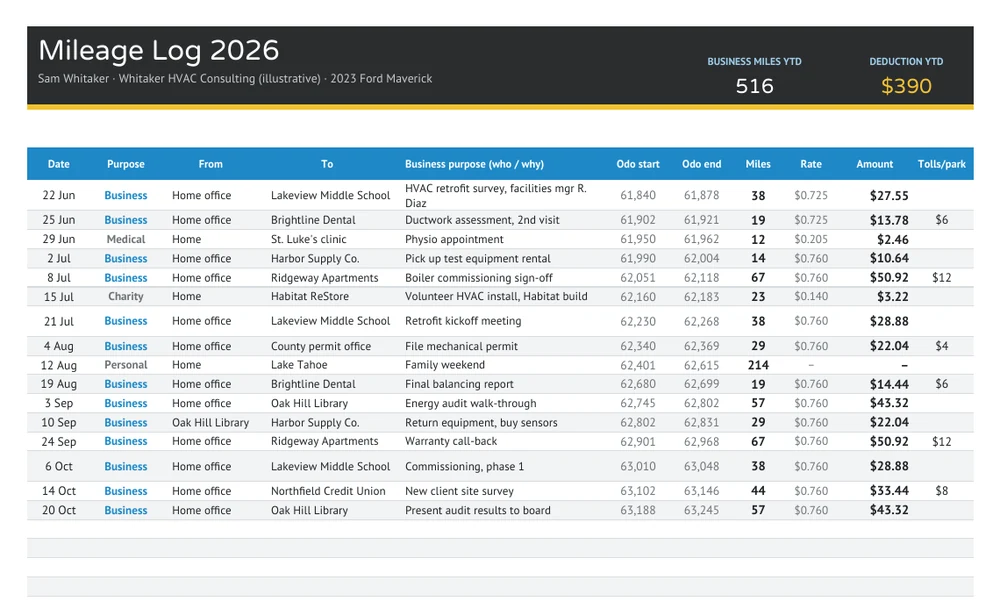
There are three tabs. Mileage Log has 40 rows (copy down for more). You pick the purpose from a dropdown and enter odometer readings, and the template calculates miles, rate and amount. A miles figure turns red if the start reading is lower than the previous trip’s end reading, which catches mistyped odometers. Year-to-date business miles and the deduction sit in the header. Summary totals each month by purpose, then shows total miles, business-use percentage, the business deduction, tolls and parking, and the charity deduction. Rates & Vehicle holds the rate table with sources, the vehicle details and the 1 January odometer reading.
The Word monthly mileage report
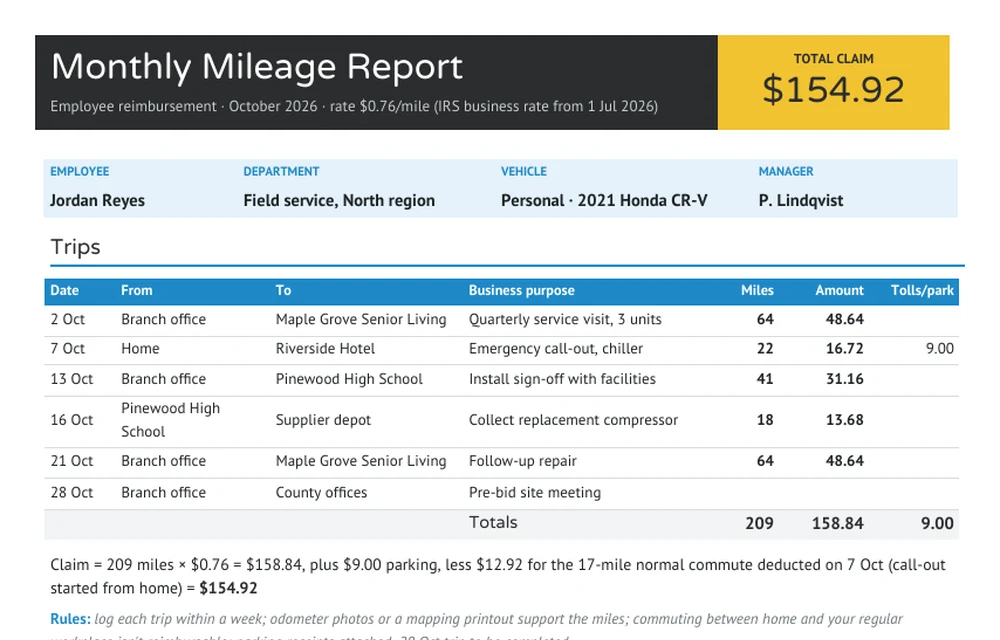
This one is for employees claiming from an employer. It covers one month on one page. There’s a header with the rate and total claim, the employee and vehicle details, a trips table, and a single line that shows how the claim was worked out. The sample includes a common adjustment: Jordan’s 7 October call-out started from home, so the 17-mile normal commute is taken off. The rules line at the bottom sets out the company policy in one sentence. Attach it to a travel expense report when the month also has hotels or meals, or file it with your regular expense report.
FAQ
Can I reconstruct a mileage log at the end of the year?
You can rebuild it from calendars, invoices and map distances, and that’s better than nothing. But records made at the time carry much more weight, and a reconstructed log is the first thing an examiner will question. If you’ve fallen behind, rebuild the log now and keep it up weekly from here on.
Do trips from my home office count as business miles?
If your home office is your principal place of business, trips from home to clients or job sites are generally business travel, not commuting. That’s why Sam’s log starts most trips at “Home office”. If you have a regular office elsewhere, the trip from home to that office is commuting.
Is mileage reimbursement taxable to the employee?
Generally not, if your employer has an accountable plan. You submit a log like this one, the trips have a business purpose, and the rate is at or below the IRS rate. Payments above the IRS rate, or flat car allowances paid without a log, are generally treated as taxable wages and run through payroll.
Sam Whitaker, Jordan Reyes, their employers and all trips are illustrative. This page summarizes IRS mileage rules for general information and isn’t tax advice. Confirm your situation with a tax professional.