

An employee performance report template gives managers a fair, consistent way to evaluate how well an employee is doing in their role. Instead of writing a review from a blank page, you can use a ready-made performance review form or performance scorecard to rate core competencies, check progress against goals, record strengths and areas for improvement and agree on a development plan.
On this page you can download two free, fully editable templates that work in very different ways: an Employee Performance Scorecard in Excel that calculates weighted competency scores, goal achievement and an automatic overall rating with a radar chart, and an Employee Performance Review Form in Word designed for the face-to-face appraisal meeting, with checkbox ratings, comments, a development plan and signatures. Both suit small businesses, HR teams, team leaders, schools, hospitals and non-profit organizations.
What Is an Employee Performance Report?
An employee performance report is a document that summarizes an employee’s work performance over a defined period, such as a probation period, a quarter or a full year. It usually includes ratings for key competencies (for example job knowledge, quality of work, communication and teamwork), results against agreed goals or KPIs, the manager’s comments, the employee’s own comments and an overall performance rating.
Performance reports are also called performance appraisals, performance evaluations or employee review forms. They are a core HR record: they support decisions on pay rises, promotions, training and confirmation after probation, and they create a written history that can be reviewed in later assessment reports or annual reports.
Why Use an Employee Performance Report Template?
Using the same template for every employee makes reviews faster, fairer and easier to compare. A good performance evaluation template helps you to:
- Rate everyone on the same criteria so reviews are consistent across teams and managers.
- Reduce bias by using a clear 1–5 rating scale with defined meanings.
- Link performance to goals by comparing targets with actual results.
- Calculate a fair overall score with weighted competencies instead of a gut feeling.
- Have better review conversations with strengths, improvement areas and comments in one place.
- Plan development with specific actions, support and target dates.
- Keep a documented record signed by the employee and manager for HR files.
Free Employee Performance Report Templates (Editable)
1. Employee Performance Scorecard Template (Excel)
This employee performance scorecard in Excel is built for managers who want an objective, numbers-based evaluation. Enter the employee name, ID, job title, department, manager and review period, then choose the review type (Annual, Mid-Year, Quarterly or Probation) from the drop-down list. Section A lists eight competencies – job knowledge, quality of work, productivity, communication, teamwork, initiative, problem solving and attendance – each with its own weight. Enter a rating from 1 to 5 and the sheet calculates the weighted score automatically, with ratings colored from red to green.
Section B tracks up to six goals or KPIs with a target and an actual result. The template works out the percentage achieved and converts it into a goal rating (for example 110% or more = 5, 100% = 4). Section C combines the competency score (70%) and goals score (30%) into an overall performance score and an automatic rating such as Exceeds Expectations or Needs Improvement. A radar chart shows the employee’s competency profile at a glance, and there is room for manager notes and signatures.
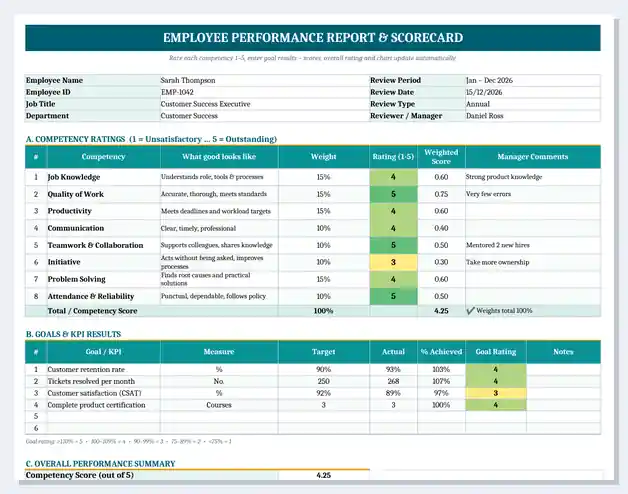
Best for: annual and quarterly reviews, sales and operations teams with measurable targets, and HR teams that want comparable scores across employees.
2. Employee Performance Review Form Template (Word)
This performance review form in Word is a printable, conversation-friendly appraisal document. It opens with employee information and a clear rating scale (1 = Unsatisfactory to 5 = Outstanding), followed by a performance ratings table where the manager ticks a box for each competency and adds a short comment. A goals review section lets you mark each objective as Exceeded, Met or Not Met with notes.
The second page focuses on the employee’s growth: key strengths and achievements, areas for improvement, a development plan with actions, support needed and target dates, an overall rating checkbox, a section for the employee’s own comments and signature lines for the employee, manager and HR. It is ideal for filling in during or after the review meeting, either on screen or on paper.
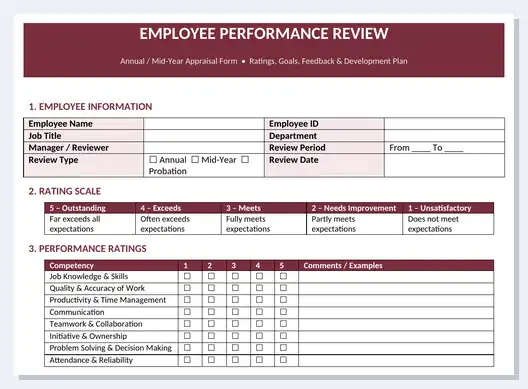
Best for: annual appraisals, probation reviews, small businesses without HR software, and managers who prefer a written, discussion-based review.
What to Include in an Employee Performance Report
A complete performance evaluation report should cover the following sections:
| Section | What to include | Why it matters |
|---|---|---|
| Employee details | Name, ID, job title, department, manager, review period and type | Identifies the review and the period it covers |
| Rating scale | Definitions for each rating, e.g. 1–5 | Makes ratings consistent between managers |
| Competency ratings | Scores for skills and behaviors with comments | Shows how the employee does the job |
| Goals and KPIs | Targets, actual results and % achieved | Shows what the employee delivered |
| Strengths | Key achievements and positive behaviors | Recognizes good work and motivates |
| Areas for improvement | Specific gaps with examples | Gives clear, actionable feedback |
| Development plan | Actions, training, support and target dates | Turns feedback into growth |
| Overall rating | Final score and rating band | Supports pay, promotion and HR decisions |
| Comments and signatures | Employee comments, manager and HR sign-off | Confirms the review was discussed and agreed |
How to Write an Employee Performance Report (Step by Step)
- Prepare before the review. Gather the job description, last review, goals, KPI data, progress reports and examples of work.
- Ask for a self-assessment. Let the employee rate themselves first; differences make a good starting point for discussion.
- Rate each competency. Use the 1–5 scale and write one specific example for every rating.
- Review goals and results. Enter targets and actual results; the Excel scorecard calculates % achieved and the goal rating.
- Calculate the overall score. Combine competency and goal scores using your weights (for example 70/30).
- Write strengths and improvement areas. Be specific, factual and focused on behavior, not personality.
- Agree on a development plan. Set two or three SMART actions with support and target dates.
- Hold the review meeting. Discuss the report, listen to the employee and record their comments.
- Sign and file. Have the employee, manager and HR sign, then store the report securely.
How the Performance Score Is Calculated
The Excel scorecard uses simple, transparent formulas that you can adjust to your own review policy:
- Weighted competency score = Rating × Weight. For example, a rating of 4 for Quality of Work with a 15% weight gives 0.60.
- Competency score = sum of all weighted scores (weights must total 100%).
- % achieved = Actual ÷ Target. Sales of $132,000 against a $120,000 target = 110%.
- Goal rating: 110%+ = 5, 100–109% = 4, 90–99% = 3, 75–89% = 2, below 75% = 1.
- Overall score = (Competency score × 70%) + (Average goal rating × 30%).
| Overall score | Rating | Typical meaning |
|---|---|---|
| 4.50 – 5.00 | Outstanding | Consistently far exceeds all expectations |
| 3.50 – 4.49 | Exceeds Expectations | Often goes beyond what the role requires |
| 2.50 – 3.49 | Meets Expectations | Fully and reliably performs the role |
| 1.50 – 2.49 | Needs Improvement | Meets some but not all expectations |
| Below 1.50 | Unsatisfactory | Does not meet the basic requirements |
Employee Performance Review Phrases (Examples)
Clear, specific comments make a performance report far more useful than ratings alone. Here are some examples you can adapt:
- Quality of work: “Delivers accurate, well-organized reports with very few corrections needed.”
- Communication: “Keeps stakeholders informed with regular, concise updates.”
- Teamwork: “Willingly supports colleagues during peak periods and shares knowledge.”
- Initiative: “Identified and fixed a recurring process issue without being asked.”
- Needs improvement: “Should plan work further ahead to meet deadlines consistently.”
- Development: “Will complete advanced Excel training by the end of Q2 to improve reporting speed.”
Tips for Fair and Effective Performance Reviews
- Review performance throughout the year, not only at review time – keep notes or weekly reports.
- Base every rating on evidence: results, examples and KPI data.
- Avoid recency bias by looking at the whole review period.
- Use the same weights and rating scale for everyone in the same role.
- Balance positive feedback with constructive improvement points.
- Keep development goals specific, realistic and time-bound.
- Treat performance reports as confidential HR records.
Performance Scorecard vs Performance Review Form
A performance scorecard is quantitative: it uses weights, ratings and goal results to produce a numerical score, which makes it easy to compare employees and link reviews to bonuses or pay. A performance review form is qualitative and conversational: it captures comments, strengths, improvement areas and the employee’s own views. Many organizations use both – the Excel scorecard to calculate the rating and the Word form as the signed record of the review meeting. For team or department-level results, use a business report or KPI report instead.
Related Report Templates
- KPI Report Templates – track targets and key performance indicators.
- Assessment Report Templates – structured assessments and evaluations.
- Progress Report Templates – report progress against plans and goals.
- Weekly Status Report Templates – weekly updates from employees and teams.
- Business Report Templates – present results and recommendations to management.
- Daily Report Templates – record daily work and activities.
Frequently Asked Questions (FAQ)
What is an employee performance report?
An employee performance report is a document that evaluates an employee’s work over a set period. It includes competency ratings, results against goals, strengths, areas for improvement, a development plan and an overall rating, and is signed by the employee and manager.
How do I write a performance report for an employee?
Collect evidence such as goals, KPI results and examples of work, rate each competency on a clear scale, review goal achievement, write specific strengths and improvement points, agree on a development plan, then discuss and sign the report with the employee.
What is a good rating scale for performance reviews?
A 5-point scale is the most common: 1 Unsatisfactory, 2 Needs Improvement, 3 Meets Expectations, 4 Exceeds Expectations and 5 Outstanding. Define each level clearly so all managers use it the same way.
How is an overall performance score calculated?
Multiply each competency rating by its weight and add them up to get a competency score, convert goal achievement into a rating, then combine the two using your chosen weights, for example 70% competencies and 30% goals. The Excel scorecard on this page does this automatically.
How often should employee performance reviews be done?
Most organizations hold a formal annual review with a mid-year check-in. Many now add quarterly reviews or monthly one-to-ones, and new hires usually have a probation review after three to six months.
Can I use these templates for a probation review?
Yes. Select ‘Probation’ as the review type in the Excel scorecard, or write it in the review period field of the Word form. You can reduce the goals section to the objectives set for the probation period.
Are these performance review templates free and editable?
Yes. Both templates are free to download and fully editable. You can change the competencies, weights, rating scale and wording and open them in Microsoft Excel and Word, LibreOffice, Google Sheets or Google Docs.

![20+ Weekly Report Templates [Excel, Word & PDF]](https://www.reportsexcel.com/wp-content/uploads/2025/09/weekly-report-.png)
You must be logged in to post a comment.