

A maintenance report template helps you plan, record and report all the maintenance work done on your equipment, machines, vehicles and buildings. Instead of relying on memory, paper notes or scattered emails, you can use a ready-made preventive maintenance schedule, maintenance log and equipment maintenance report to see what is due, what is overdue, what was fixed and how much it cost.
On this page you can download two free, fully editable templates that do two different jobs: a Preventive Maintenance Schedule & Log in Excel that calculates next due dates, flags overdue tasks automatically and summarizes cost and downtime by maintenance type, and an Equipment Maintenance Report / Work Order in Word for documenting each job from request to sign-off, including a safety checklist, root cause, parts and labour. They are suitable for factories, facilities teams, property managers, workshops, fleets, hospitals, schools and small businesses.
What Is a Maintenance Report?
A maintenance report is a document that records maintenance activities carried out on an asset during a specific period or for a specific job. It usually shows the equipment details, the type of maintenance (preventive, corrective, breakdown or inspection), the work performed, parts and materials used, labour hours, downtime, cost, the technician responsible and the current status of the asset.
There are two common types. A maintenance schedule and log tracks all assets and planned tasks over time, while an equipment maintenance report (often called a work order) documents a single repair or service in detail. Maintenance reports work closely with inspection reports, which identify problems, and incident reports, which record breakdowns or safety events that may require maintenance.
Why Use a Maintenance Report Template?
A structured maintenance reporting system keeps equipment running, reduces unplanned downtime and controls costs. A good template helps you to:
- Never miss a service with automatic next-due dates and overdue alerts.
- Reduce breakdowns by moving from reactive repairs to planned preventive maintenance.
- Track maintenance cost for parts and labour by asset and by maintenance type.
- Measure downtime and identify the machines that fail most often.
- Improve safety with lock-out/tag-out and inspection checklists.
- Keep an audit trail for insurance, warranty claims, ISO and health & safety audits.
- Plan budgets using real maintenance history instead of estimates.
Free Maintenance Report Templates (Editable)
1. Preventive Maintenance Schedule & Maintenance Log Template (Excel)
This preventive maintenance schedule in Excel is a complete planning and tracking workbook. On the PM Schedule sheet, list each asset with its ID, equipment name, location, maintenance task, type, frequency in days, date last done and the person assigned. The template calculates the next due date and the days left automatically, then shows a color-coded status: OVERDUE in red, Due Soon (within 7 days) in yellow and On Schedule in green. A schedule summary counts total tasks, overdue tasks, tasks due in the next 7 days and calculates your PM compliance %.
The second sheet, Maintenance Log, records every job with date, work order number, asset ID (the equipment name is looked up automatically), maintenance type, description, technician, downtime hours, parts cost, labour cost, total cost and status. A summary table shows the number of jobs, downtime and total cost for each maintenance type – preventive, corrective, breakdown, inspection and calibration – with a chart of maintenance cost by type.
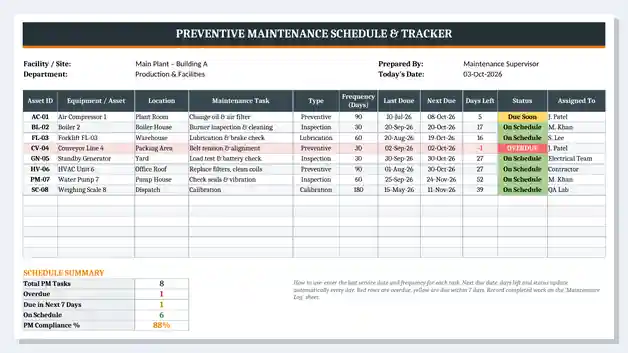
Best for: maintenance planners, facility managers, plant engineers and small businesses that need a simple CMMS alternative in Excel.
2. Equipment Maintenance Report / Work Order Template (Word)
This equipment maintenance report in Word is a printable work order form for documenting individual maintenance jobs. It starts with work order details – work order number, date requested, requested by, department, target completion date, priority (Low, Medium, High, Urgent) and maintenance type (Preventive, Corrective, Breakdown, Inspection, Calibration). The equipment section records the equipment name, asset or tag number, make and model, serial number, location, last service date, meter or running hours and whether the equipment is down.
The report continues with a problem description, a safety and inspection checklist (including lock-out/tag-out, visual inspection, lubrication, belts and filters), work performed and root cause, a parts and materials table with totals, labour and downtime, status and follow-up actions, and a completion sign-off for the technician, supervisor and requester. It is ideal for technicians in the field and for keeping a signed record of each job.
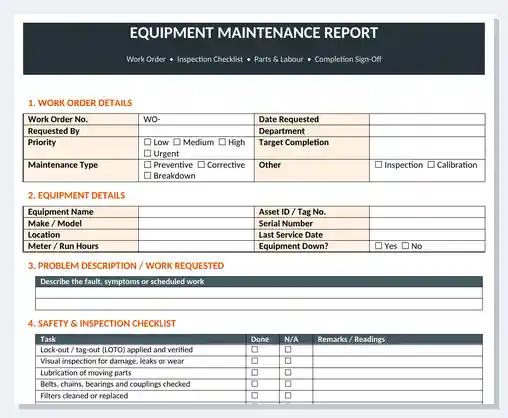
Best for: maintenance technicians, repair requests, breakdown reports, contractors and any job that needs a signed completion record.
What to Include in a Maintenance Report
A complete maintenance report should include the following information:
| Section | What to include | Why it matters |
|---|---|---|
| Asset details | Asset ID, equipment name, make, model, serial number, location | Identifies exactly which equipment was serviced |
| Maintenance type | Preventive, corrective, breakdown, inspection or calibration | Shows how much work is planned vs reactive |
| Schedule | Frequency, last done date, next due date | Prevents missed services |
| Problem / task | Fault description or planned task | Explains why the work was needed |
| Work performed | Actions taken, root cause, test results | Builds a useful repair history |
| Parts and materials | Part numbers, quantities and costs | Controls spare parts and maintenance spend |
| Labour and downtime | Technician, hours worked, downtime hours | Measures productivity and equipment availability |
| Safety checks | Lock-out/tag-out, PPE, inspection checklist | Protects workers and supports compliance |
| Status and sign-off | Completed, pending parts, follow-up, signatures | Confirms the job is closed and accepted |
How to Create a Preventive Maintenance Schedule (Step by Step)
- List all assets. Record every machine, vehicle and building system with a unique asset ID and location. An inventory report is a good starting point.
- Define maintenance tasks. Use manufacturer manuals to list tasks such as lubrication, filter changes, belt checks and calibration.
- Set the frequency. Enter how often each task is needed in days (e.g. 30, 60, 90 or 180 days).
- Enter the last service date. The Excel template calculates the next due date and days left automatically.
- Assign responsibility. Add the technician, team or contractor for each task.
- Review the status every week. Focus on red OVERDUE and yellow Due Soon tasks first.
- Log completed work. Record each job in the Maintenance Log with downtime and cost, then update the last done date.
- Use work orders for repairs. Complete the Word equipment maintenance report for breakdowns and corrective work.
- Report monthly. Share PM compliance, downtime and cost by type in your monthly report.
Maintenance KPIs and Formulas
The Excel template calculates the key figures automatically, and you can add more maintenance KPIs using these formulas:
- Next due date = Last done date + Frequency (days).
- Days left = Next due date − Today. A negative number means the task is overdue.
- PM compliance % = 1 − (Overdue tasks ÷ Total PM tasks). With 1 overdue task out of 8, compliance is 87.5%.
- Total maintenance cost = Parts cost + Labour cost.
- MTBF (mean time between failures) = Total operating hours ÷ Number of failures.
- MTTR (mean time to repair) = Total repair downtime ÷ Number of repairs.
- Planned maintenance % = Preventive jobs ÷ Total jobs × 100. Many teams aim for 80% or more.
Tracking these numbers over time shows whether your maintenance program is working. You can present them alongside other targets in a KPI report and compare actual maintenance spend with plan in a budget report.
Types of Maintenance Explained
| Maintenance type | Description | Example |
|---|---|---|
| Preventive | Planned tasks at fixed intervals to prevent failure | Changing air compressor filters every 90 days |
| Corrective | Fixing a fault found before it causes a breakdown | Replacing a worn conveyor belt found during inspection |
| Breakdown | Emergency repair after equipment stops working | Repairing a failed forklift hydraulic pump |
| Inspection | Checking condition, safety and performance | Monthly fire equipment or HVAC inspection |
| Calibration | Adjusting instruments to keep measurements accurate | Calibrating weighing scales every 6 months |
Tips for Better Maintenance Reporting
- Give every asset a unique ID and label it physically on the equipment.
- Record maintenance on the same day it is done – use daily reports for busy teams.
- Always write the root cause for breakdowns, not just the fix.
- Track downtime separately from labour hours to see the real impact on production.
- Keep critical spare parts in stock for equipment with frequent failures.
- Review the most expensive and most frequently repaired assets every quarter.
- Keep signed work orders for warranty, insurance and audit purposes.
Maintenance Report vs Service Report vs Inspection Report
A maintenance report tracks the planned and unplanned work done to keep your own assets in good condition, including schedules, history, cost and downtime. A service report is usually completed by a technician or contractor after a service visit to a customer, and focuses on the work done and customer sign-off. An inspection report records the condition of equipment or a site at a point in time and often triggers maintenance work. Used together, they give you a full picture of asset condition, work performed and follow-up actions.
Related Report Templates
- Inspection Report Templates – check equipment, sites and safety conditions.
- Service Report Templates – document service visits and customer sign-off.
- Incident Report Templates – record breakdowns, accidents and near misses.
- Inventory Report Templates – track spare parts and stock levels.
- Site Visit Report Templates – report findings from site and facility visits.
- Daily Report Templates – record daily work, issues and progress.
Frequently Asked Questions (FAQ)
What is a maintenance report?
A maintenance report is a document that records maintenance work carried out on equipment, vehicles or facilities. It includes asset details, maintenance type, work performed, parts used, labour, downtime, cost, status and sign-off.
How do I make a preventive maintenance schedule in Excel?
List each asset and task with its frequency in days and the date it was last done. Calculate the next due date as last done plus frequency, and days left as next due minus TODAY(). Use conditional formatting to highlight overdue and due-soon tasks. The free Excel template on this page already includes these formulas, status colors and a PM compliance summary.
What should be included in an equipment maintenance report?
Include the work order number, equipment details, priority, maintenance type, problem description, safety checklist, work performed, root cause, parts and materials, labour hours, downtime, status, follow-up actions and signatures.
What is the difference between preventive and corrective maintenance?
Preventive maintenance is planned at regular intervals to stop failures before they happen. Corrective maintenance fixes a fault after it has been found, either during an inspection or after a breakdown.
What is PM compliance?
PM compliance is the percentage of planned preventive maintenance tasks completed on time. It is calculated as 1 minus overdue tasks divided by total PM tasks. Many maintenance teams aim for 90% or higher.
How often should maintenance be done?
It depends on the equipment, the manufacturer’s recommendations, operating hours and conditions. Common intervals are monthly, quarterly, every six months and annually. Critical equipment and equipment working in harsh conditions usually needs more frequent maintenance.
Are these maintenance templates free and editable?
Yes. Both templates are free to download and fully editable. You can add your own assets, tasks, frequencies and logo and open them in Microsoft Excel and Word, LibreOffice, Google Sheets or Google Docs.

![18+ Incident Report Templates [MS WORD]](https://www.reportsexcel.com/wp-content/uploads/2025/09/incident-report-.png)
You must be logged in to post a comment.